
Application main window
The main window of Dr.Explain allows you to manage your project elements. In this window, you may create new projects, add new elements and manage application options and project settings.
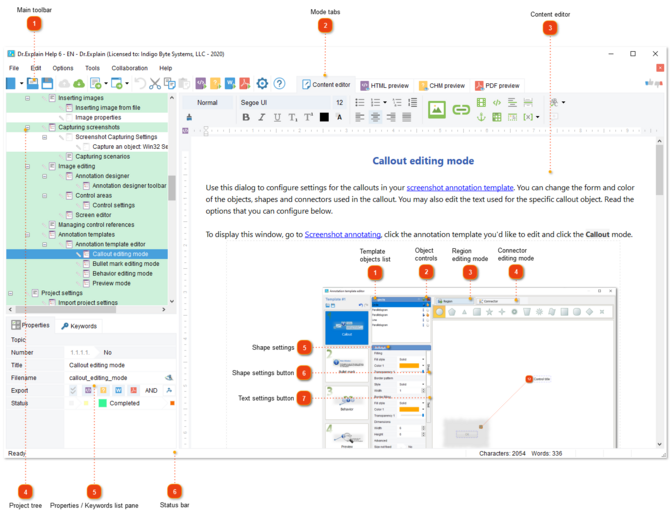
 Main toolbar Dr.Explain's main toolbar provides quick access to the key functions of Dr.Explain:
 — click this button to create a new project. — click this button to create a new project. — click this button to open an existing project. — click this button to open an existing project. — click this button to save the current project. — click this button to save the current project. — click this button to commit all changes to the server when working with a shared project. — click this button to commit all changes to the server when working with a shared project. — click this button to update the project and to retrieve changes from the server when working with a shared project. — click this button to update the project and to retrieve changes from the server when working with a shared project. — click this button to insert a new topic page or import external files into the project. — click this button to insert a new topic page or import external files into the project. — click it to capture a new window, parse its structure and add a new window screenshot and all its control references to the project. See section Capturing screen for more details. Drop-down menu allows you to add a screenshot from a saved graphical file or clipboard. — click it to capture a new window, parse its structure and add a new window screenshot and all its control references to the project. See section Capturing screen for more details. Drop-down menu allows you to add a screenshot from a saved graphical file or clipboard. — click this button to undo the latest action. — click this button to undo the latest action. — click this button to cut the selected element from the project tree or text and copy it to the application's clipboard. — click this button to cut the selected element from the project tree or text and copy it to the application's clipboard. — click this button to copy the selected project tree element or text into the application's clipboard. — click this button to copy the selected project tree element or text into the application's clipboard. — click this button to paste the element from the clipboard into the project's tree or content editor. — click this button to paste the element from the clipboard into the project's tree or content editor. — click this button to export the current project into HTML online help format. — click this button to export the current project into HTML online help format. — click this button to export the current project into CHM file format. — click this button to export the current project into CHM file format. — click this button to export the current project into PDF file. — click this button to export the current project into PDF file. — click this button to configure options for your current project. See chapter Project settings for more details. — click this button to configure options for your current project. See chapter Project settings for more details. — click this button to display information about Dr.Explain and registration details. — click this button to display information about Dr.Explain and registration details. |
 — click this button to export the current project into
  Mode tabs Tab control allows you to easily switch between Editing and Preview modes. See section HTML, CHM, & PDF preview for more details.
|
 Content editor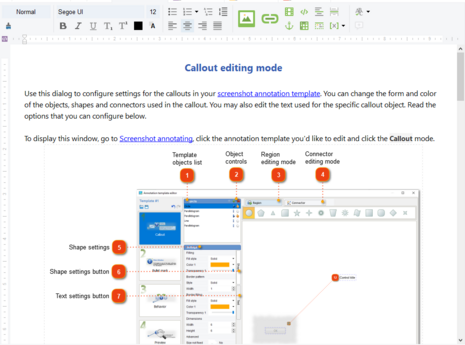 This is the main workspace of Dr.Explain. It allows you to edit topic content in WYSIWYG style. See chapter Editing content for more details.
|
 Project tree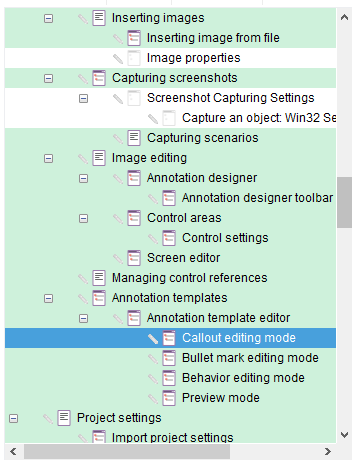 Tree view displays the structure of your project and allows you to quickly navigate through the project's elements: topics and screenshot pages.
Use the pop-up menu to add new elements to your project, rename, delete, disable or rearrange nodes.
Use Ctrl+Up and Ctrl+Down keyboard shortcuts to change the order of sibling nodes in section.
|
 Properties / Keywords list pane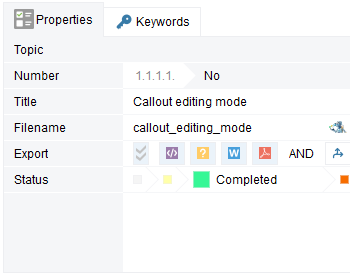 This pane allows you to manage topic properties and keyword index list.
|

