English German French Spanish Italian Portuguese Russian Svenska Nederlands

Behavior editing mode

Behavior editing mode
 
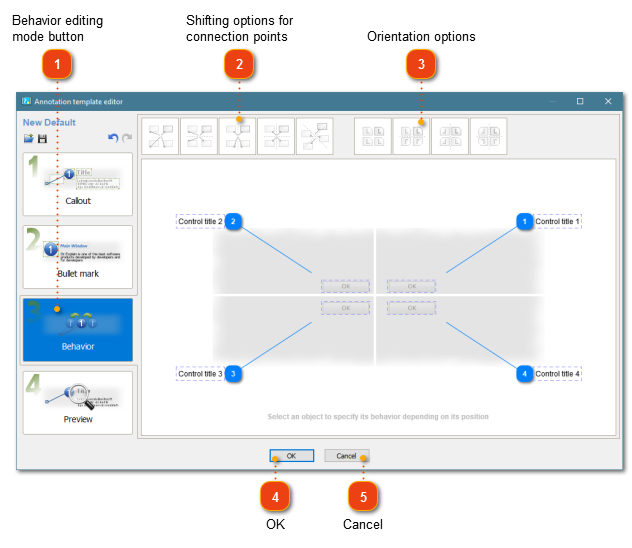
Use this dialog to configure the behavior of callouts and bullet marks in your annotation template. You can configure how connection points should be shifted and whether control titles should flipped on a screenshot.
 
To display this window, go to Screenshot annotating, click the annotation template to edit and click the Behavior mode.
 
Select an object to specify its behavior depending on its position.
1

Behavior editing mode button

1. Behavior editing~mode button
Click this button to switch to Behavior editing mode.
2

Shifting options for connection points

In this section you can specify how connection points shift on the annotation window. The following options are available:
  • - No shift of connection points
  • - Vertical shift of connection points
  • - Horizontal shift of connections points
  • - Bidirectional shift of connection points
  • - Rotational shift of connection points.
3

Orientation options

This section allows you to configure the orientation of callouts on your annotation window. The following options are available:
  • - No flip
  • - Flip orientation vertically
  • - Flip orientation horizontally
  • - Flip orientation bidirectionally
4

OK button

4. OK buttonClick this button to save your changes and close the window.
5

Cancel button

5. Cancel buttonClick this button to discard your changes and close the window.

Built with help of DrExplain