
Topic properties
In the Properties pane, you can specify topic properties such as title, Help Context ID number, filename, etc. This pane is located in the bottom-left corner of Dr.Explain window. To change a property, click at the required field and specify the new value.
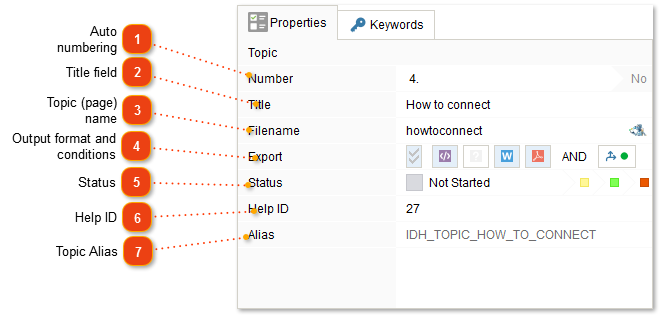
 Auto numbering Use this option to enable or disable automatic numbering for the current topic. The preview shows the number that will be assigned to the topic if this option is enabled. You can setup topic numbering style and enable or disable topic numbering for the entire project in the Common settings.
|
 Title This field displays the topic title. This text will be displayed in the table of contents in the exported document.
|
 Filename In this field you can specify the filename of the topic (without extension) for CHM and HTML output formats. For example, if this field has text "the_crm_module", and in HTML export settings extension of exported files is set to "htm", then the topic will be exported into a file with filename "the_crm_module.htm".
Gray text in this field means that the text in this field is generated automatically based on the title of the topic. If you change the value in the "Title" field, then the filename will change accordingly. You can specify the value manually, in that case it won't change when changing the title of the topic, and it'll be displayed in black.
|
 Export conditions Use these buttons to include and exclude the topic from exporting into certain formats. You can also exclude (hide) a topic from all formats by selecting it in the topic tree and pressing the Delete key or open the context menu of the topic and select Hide/Show.
Use
 to setup export conditions for the topic. This way you can create multiple documents with different table of contents out of a single Dr.Explain project. to setup export conditions for the topic. This way you can create multiple documents with different table of contents out of a single Dr.Explain project.If the topic has custom export conditions, the button will look like this:
 |


 Help Context ID Use this field to specify the Help Context ID numeric code for the context sensitive help. The numeric value of the Help Context ID is used to create context-sensitive help in the CHM files.
|

