Archive for the 'Marketing' Category

Dennis Crane

How to name software product line editions

If you decide to split your software product into several editions with different settings then you will likely wonder how to name them. Naming software editions depends upon what do you offer and what do you limit in each edition. There are several common approaches in building editions:

  • Functional limitation (F)
  • Environmental or purpose usage limitation (U)
  • Limitation of number of installations (N)

Here is a list of common edition names. The hints in parenthesis designate which of the approaches each name suits better.

Level 1
Junior (F)
Beginner (F)
Student (U)
Educational (U)
Light (F)
Lite (F)
Bronze (F,U,N)
Empower (F,U,N)
Starter (F)

Level 2
Standard (F,U,N)
Regular (F,U,N)
Intermediate (F,U,N)
Personal (U,N)
Home (U,N)
Silver (F,U,N)

Level 3
Advanced (F,U)
Professional (F,U)
Business (F,U,N)
Commercial (F,U)
SOHO /Small Office or Home Office/ (F,U,N)
Company (F,U,N)
Gold (F,U,N)
Mega (F,U,N)

Level 4
Deluxe (F,U,N)
Architect (F,U,N)
Site (F,U,N)
Enterprise (F,U,N)
Platinum (F,U,N)
Premium (F,U,N)
Exclusive (F,U,N)
Ultimate (F,U,N)

This list gives you an idea how to get started with your own software editions. Combine names from different levels to build your own successful product line.

If you know more naming examples then post them as comments please.

Dennis Crane

Getting started with Google AdWords safely

This post is a short list of basic rules for those who has recently signed up for Google AdWords account and doesn’t want to waste much money for learning curve.

Please consider the advice below with “for the first time” remark.

Focus on high quality traffic first

  • Turn off Content Network advertising
  • Allow only English language in targeting settings.
  • Allow only USA, Canada, UK, Germany, Australia, New Zealand, and other “potentially profitable” countries (Nothing personal, just cold statistics).

Differentiate your ads

  • Divide your keywords into several campaigns and groups by some syntax or semantic attributes. This will allow to create more focused ads for each group.
  • In each group create two different ads with equal rotation probability.
  • Constantly monitor those pairs of ads and replace the “weakest” one (with low CTR and conversion) with a new ad. I.e. test and look for the most effective ads for each group.
  • Test various modifications of ad elements: URL, punctuation, caps, word order, etc. E.g: www.ProductName.com or www.productname.com or productname.com or ProductName.com; website or Web Site or web-site; and so on.
  • Include search keywords in the text of your ads. Google will make them bold in search results and therefore your ad will be more visible among your competitors.

Improve your campaigns

  • Try to increase bids for a couple of the most “profitable” phrases to improve their positions. But be careful and constantly monitor the effectiveness of this approach.
  • Analyze your web logs, look for irrelevant queries and add them to the negative word list not to display your ads for them. Here is another good idea how to build negative word list

Start little and look what happens. Once you feel that you have full control and understanding of how Google AdWords works then you may turn on other countries, languages, campaigns, and ads.

Google AdWords is not a rocket science but it requires your attention and constant control to get maximum ROI out of your budget when you’re getting started.

The software improvement advice, techniques and ideas that I post here are taken from our real practice. I try to keep this blog practical and hype free. This post is a rare case (the previous one was about 9 months ago) when I’d like to tell a little about our own products.
During the recent months we have been working actively to make new versions of our existing products and to develop a new product as well. Recently we have released two new products.

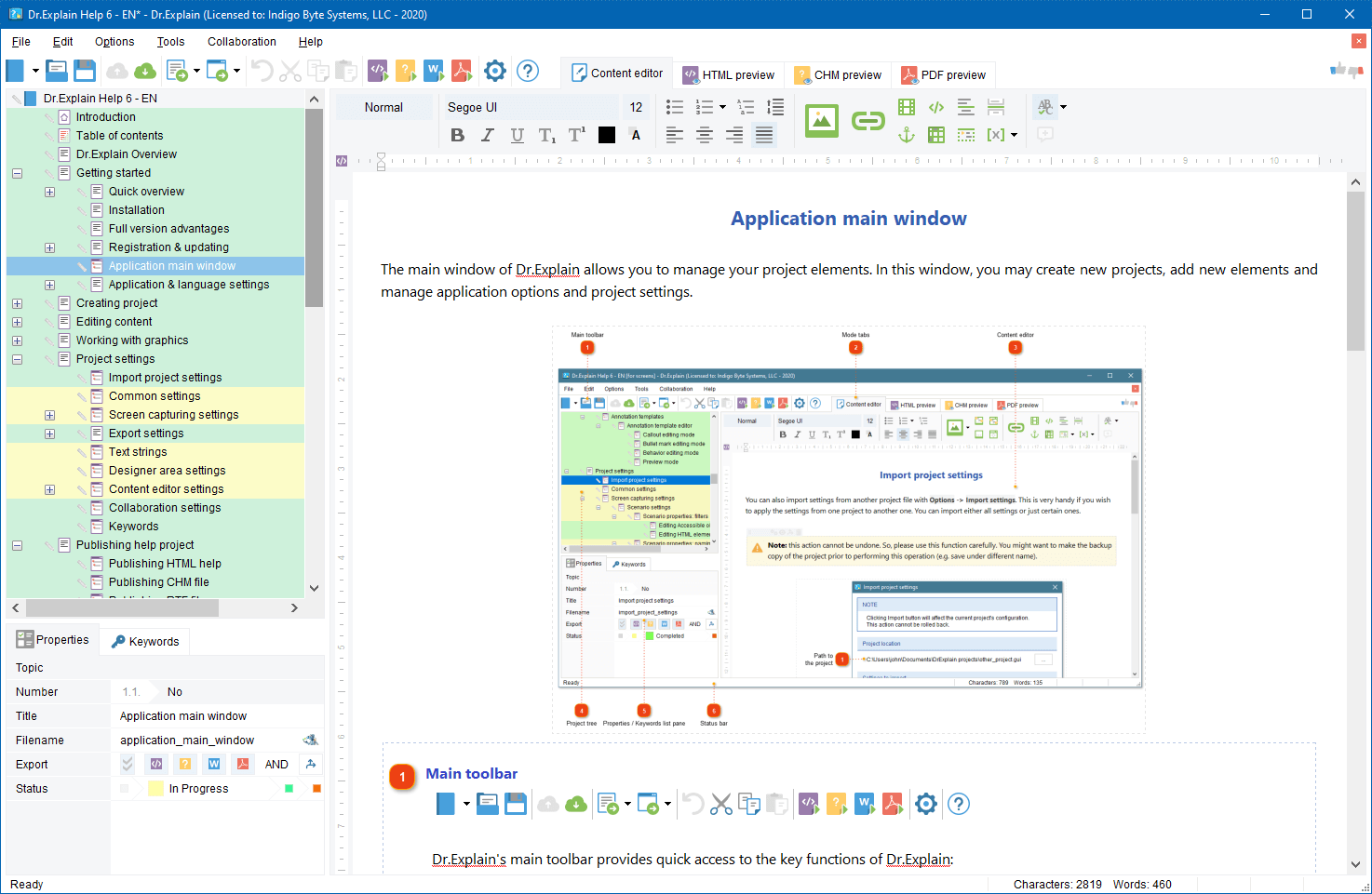
Dr.Explain 3.0

Dr.Explain v.3.0 ( http://www.drexplain.com ) is an innovative software documentation tool. Thanks to unique technology, with Dr.Explain you can produce attractive and professional looking help files just in a few hours, not in days.

The Dr.Explain captures windows, dialogs, and forms from live application and web pages, makes screenshots, and automatically adds interactive references to all controls. You have not to spend hours annotating your software GUI. Focus on your content - Dr.Explain will do all the tedious work for you. The program can produce CHM, RTF and HTML help files with annotated screenshots, live menus, cross-references, and navigation from a single source file.


Dr.Explain concept

What’s new in v.3.0

  • The new capturing engine captures and automatically documents windows, menus, GUI elements, web pages, and even flash applications
  • Revamped text editor allows pictures, tables, lists, fonts, multibyte encoding, RTL mode, etc…
  • Enhanced topic management supports topic statuses, marking and locking\unlocking
  • Lots of other improvements including optimized export routines, Google sitemap generator, predefined macro variables, and many more improvements and tweaks.

The new version download: http://www.drexplain.com/download

TBS Cover Editor

TBS Cover Editor ( http://www.trueboxshot.com ) is a full featured software box cover creator with 3D rendering and template library. We accomplished the project in partnership with True BoxShot Software.

With the TBS Cover Editor you can create your 3D box shot design in a single flat worksheet. Say goodbye to separate designs for each side; no more design slices in many image files. The single-sheet concept of the TBS Cover Editor allows you editing of all box sides on a single screen. The real time 3D preview immediately shows how your 3D box shot output image looks like without switching between different windows or applications.


TBS Cover Editor Box shot template library TBS Cover Editor box shot

With the TBS Cover Editor no additional expensive third party tools are required. The program supports all the steps of box shot creation: from drafting and design, to 3D scene setting and image rendering. You can create professional-quality 3D box shots with no extra expense in a single program. The TBS Cover Editor comes with a brilliant collection of software cover design templates for various types of software. You can make a box cover in less than two minutes.

The TBS Cover Editor has a powerful rendering engine that produces realistic 3D box shots by applying original 3D rendering and ray casting algorithms. Your every box shot will look as if it is made by a studio.

More details: http://www.trueboxshot.com

Both these products will automate the most tedious and time consuming routines of your software business – software help and documentation writing, and graphical design. The Dr.Explain and TBS Cover Editor will help you present your software product in a professional manner with minimal efforts. As a software vendor you may focus on your business growth and leave the dull operations to the specialized systems.

Wikipedia is one of the most visited resources on the Web. It’s built by people and for people. Many people from all over the world are looking for specific information on Wikipedia. The information they are looking for may be related to your software product.

Why not to turn the Wikipedia’s readers into your web site visitors and then into new users of your software? Link your web site from Wikipedia and receive several dozens of targeted visitors per day for free. Bellow, there are some hints how to do this.

Do it for people, not for search engines
Google seems to ignore incoming links from Wikipedia when calculating Page Rank for your web site. So it’s useless to link from Wikipedia to increase your Google Page Rank. There is no SEO in it. The main goal is attracting real people, not SE robots.

Start little
If your software product is popular then somebody likely has always created an article about you on Wikipedia and put a link to your web site in it. If your product is quite young and there are no articles about your software then you may look for articles that are relevant to your niche and add your link into References or Extras sections of them.

Observe the rules
Lurk for a while before adding your links into every article. See what links are appropriate and what kind of web sites are linked from Wikipedia. Try to add your link into a single relevant article first and wait for a couple of days to see if moderators accept or remove your contribution.

Monitor your competitors
Search for your competitors mentioned in the Wikipedia and try to add your plug into the same articles.

Be extremely relevant
Don’t add link to ‘ABC Super Audio Player’ into an article about ‘Jazz Music’. Otherwise, moderators will remove your contribution and may even ban your IP to prevent from future irrelevant contributions.

Link to information, not to infomercial
You can hardly add a link that points to the main page of your commercial product web site. I’m sure it will be rejected. You must give people really valuable information, not pure advertisement, and you must give it for free.

The appropriate information types on your website to link from Wikipedia are:
- Troubleshooting articles and white papers
- Statistical reports and analytics
- Freeware or open source tools and utilities
- Knowledge bases and How-To
- Tutorials
- Free on topic e-books and pod-casts
- … etc.

Name the link properly
The link title must be also relevant to the article topic. Look how other links are titled and name your one accordingly. Try to avoid directly mentioning you product in the title. It should not look like an ad.

Keep these simple points in your mind and you will see that being on Wikipedia is an easy way to get additional free and targeted traffic for your web site and, therefore, to increase the popularity of your product.

Recently, I’ve attended ISDEF 2007 conference and now I have new topics to discuss in this blog.

One of the most important resources for software marketing is press. After getting mentioned in a well known magazine or in a vertical newsletter even once, you may receive much more sales in a single day than in several weeks before the publication. If the famous magazines and newspapers mention your product regularly then your brand will get well recognized and your business will be flourishing. There is no secret. Everyone knows this.

Also, everyone knows that the most simple way to get into the press is sending press releases to editors and journalists. Major version update is an excellent reason to send out a press release, but what to do if you release new major versions only once a year? Editors want real news because their readers want real news too. They like to read about problems and new solutions. They don’t want to read every month about a new minor update #2.3.7.3848.x which includes two bug fixes and one typo correction.

You have to find new topics for press releases besides new updates. The topic must be newsworthy and in the same time relevant to your product or service. Here is a few points what your next press release may be about:

  • It’s non necessary to write press releases about your product.
  • Write about your area of expertise. Become an expert.
  • Write regular comments on notable events in your target niche.
  • Dig up interesting figures and facts related to your niche and comment on them. Readers like figures.
  • Compose analytical reports about tendencies in your sector. Analyze what has happened and what has changed for the past period. Use comparison charts and tables.
  • Predict new trends. People like predictions but be careful.
  • Publish such reports on regular basis, e.g. weekly, monthly, etc.
  • Interview other experts in your niche regarding an interesting topic and add your own thoughts, ideas, and comments.
  • Setup polls on hot topics and publish poll results together with your comments.
  • Write about really interesting use case and best practices of your software usage. If your clients or partners are well known in the industry then mention them, but make sure you have a permission to disclose this information. Give figures and results. Show how effective your solutions in real practice.

This is just a few ideas to help you get you name or brand into the press. There are many things in your business or niche that may become an excellent topic for interesting and newsworthy press release. Be creative!

Dennis Crane

How to spin up a forum on your website

If you decided to setup a forum on your company or product website then the most annoying question is likely: “Initially, my forum will be empty and will look silent. This will deter people from joining the community. What to do?” As a moderator of several forums, I’d like to share a tip regarding the question.

Initially, don’t create too many sections. While your forum isn’t very popular each section would contain just a few posts and overall the forum would look inactive.

Create just a couple of general sections and have all posts there. So, these sections will be active and, therefore, the whole forum will look alive. Later, you may create more focused sections and move the appropriate posts there from the general section. Thus, the newly created section will be immediately filled with many posts and will also look active.

This simple trick will help you quickly spin up your forum and build a community around your product with minimal efforts.

This post is written by our special guest, Sergey Petrov.
Sergey is a CEO of SoftLogica. The most known software titles by SoftLogica are Backup Platinum - a powerful backup program for Windows OS, and Handy Recovery - a data recovery software that restores deleted files or files from deleted and formatted partitions.

After many years in ISV business, Sergey knows many secrets of how to succeed in the market. Today he unveils 8 reasons for acquiring a separate domain for each software product.

Separate domain for each product or one general site? I think it’s fair to say that I’ve participated in discussions on this topic several dozens of times.
Now all my considerations should be brought together, so that they can be referred to easily.

Type-in Traffic: If your product becomes somewhat popular, sooner or later some clients (at least, out of mere curiosity) will type in the browser’s address bar www.product.com. So why loose such a “delicious” traffic?

SEO: Firstly, if a product name contains a keyword from its niche, the domain name derived from it will give some added advantage. Secondly, all website pages will targeted to a specific niche.

Design Freedom: Different products may require different market approaches, including differences in site structure, colour spectrum, layout etc. Is a “universal” design worth loosing efficiency?

Anamnesis: It is much easier to keep in mind one entity (a product name) than two (a product name and a company name). As for me, I could hardly recollect vendor names for the heaps of software that I use every so often. It may seem that a user doesn’t need to remember a URL consisting of two entities, that is, it’s enough to remember just a company name. But it is well known that every extra click results in loosing visitors.

Analytics: It is much easier to analyze a separate site than a part of a general one. Any superstructure makes visitors’ behaviour hardly predictable.

Link Building: Sometimes a website allows placing links only to a homepage, and doesn’t allow placing links to other pages. In most cases the problem can be solved, however, it will require additional efforts.

First impression: A man is an emotional being in many respects. Therefore, a good suit and a necktie produce an impression on people even before they get acquainted with you. Thus, imagine a reseller hearing with half an ear a product name and\or catching a glimpse of URL in a printed material: he’s already had the first impression about your product.

Scalability: Perhaps, some day you’ll decide to sell a product and the related stuff “in gross”. Will it be possible to deliver everything to a new owner without loosing some integral parts?

Thanks for sharing this, Sergey!
Here is another interesting article from SoftLogica.

I have an idea which I would share. It’s a raw concept but I’m sure that you can polish it and use somehow in your business.

Remember the installers that show slides with software features and benefits during the installation process. I’m sure that some of your applications also have such processes when a long operation performs and user simply has to be watching the progress bar for several minutes.
Why not to show a user something else during this period of time? E.g. you may show a tip of the day, news (e.g. RSS feed), link to your site/blog, a marketing slogan, or even a banner.

How it differs from adware:
1. You don’t bother your user while he actually works.
2. You display the a plug only while the user is bored and awaiting for the end of long process.
3. You may display not only ad, but also something interesting and valuable for user.

Installers have been using this technique for a long time and I wonder if other types of applications can use this trick also. I think this technique may be used in applications that deal with huge data processing, conversion routines, model rendering, compilation, etc., i.e. where there are routines taking up to several minutes. Why to waste those minutes?

Dennis Crane

Gathering feedback from your customers

Bob Walsh has recently written “Email one customer a day” post in his 47hats blog.

Here is the post’s summary:

Try emailing one customer a day. Pick a customer who bought your product or who signed up for your Web 2.0 service some time back and send them a friendly, short email:

“Dear Bill,

Just a quick email to see how you are doing with MasterList Professional. Any issues or sticking points or suggestions?

Regards,
Bob Walsh”

This is really simple and may be very effective for gathering feedback from your software users. I know many ISVs who use this approach and I use it too for some products.

But if you use this method why to e-mail only ONE customer?
Automate it! Write a simple script\app that once a day will pick all customers who bought from you e.g. 7 or 14 days ago and will send them the personalized messages “Dear [name], … ”.

Everything will remain the same but you will save your valuable time and you will cover all your user database, not only one customer.

During the last weeks I saw several posts on various ISV and shareware forums where people complained that their sales had decreased and that summer is the worse period for software business.

Overall, I have to agree that in summer the business activity goes down. Nevertheless, summer offers a good chance to boost your software business in the long run. Let me explain …

This is not only the number of orders that is decreased in summer. The volume of support requests usually goes down also.
While you have less support job you may focus on your projects solely. Devote this time to planing, software development and improvement, market research and trends analysis. Summer is a good time to leisurely prepare and test a new product or a new release of your existing product to launch it in September or October when the business activity rises again.

Like Christmas, summer is a time for savings
As many businesses (And what about you?) try to keep their falling sales on a certain level they often setup special discount offers for summer months. Thus, it’s a good chance to buy business tools (software, SDKs, scripts, libraries, etc.) or to order some professional services (design, testing, copy writing) with significant discounts. Think about tools that you will need in future but it might be cheaper to buy them now.

Your news seem more significant against the summer lull.
If you have a news that might be interesting to your potential customers then don’t wait till Fall. Send your press release now. Because the flow of corporate news is not so big in summer your press release will more likely get in front of an editor than in any other period. Even a message about a minor version release may appear in the top news section of a huge portal or a magazine.

Announce in summer to reach your market on the peak.
Big paper magazines have a long publishing cycle. If editor picks your news for publishing or for a featured article writing then it will be printed in several months, usually 3-6. Therefore, if your send your press release in summer then it may appear in October or December issue of the magazine. Your message will reach the market right in the most active period. That will be great.

These are just a few evidences for the idea that summer is not a bad time for software business. Try to use the summer slack with the most possible effectiveness for your ISV business but don’t forget about the rest :-).

« Prev - Next »