Archive for the 'Documentation' Category

Scott, an ISV-entrepreneur, on BoS forum has recently complained that since their company had reached a new level of technical documentation the number of service requests grew up.

That’s an interesting effect!

Scott wrote:

Two reasons for this, based on feedback from customers seeking support:

1. Documentation is now so comprehensive that it is intimidating. People see a 1000 page manual and say “no thanks - I’ll just call customer support instead.”

2. Documentation has so much cool stuff described, that it makes people’s imagination stimulated and they start thinking of other, even more exotic stuff they want to do but can not figure out and start a service request for it.

Thus, the common solution to service requests - better documentation - actually causes more service requests, not fewer.

Is this really true and good documentation will harm to your business?

I think that only a big number of pages doesn’t mean that the manual is good. In documentation, users look for problem solutions. The more important thing than the number of pages is the structure of the manual and simplicity of search mechanisms (indexes, built-in troubleshooters, context help, etc. ).

Recently, we needed a presentational video for an affiliated service that allows health conscious people to track their diabetes, blood pressure, or body weight records and to share the results.

The main difficulty of the project was a voice-over for the video. We needed a clear, calm and native English speech but there are no native English speaking members in our team.

The two services helped us in this matter.

EditAvenue.com is a proofreading and editing service marketplace that helped us to proofread the draft of the written script for the voice-over.

If you are non-native English speaker then through EditAvenue you can access hundreds of professional editors who can correct and refine your written communication. The prices start from about $4 per page (300 words). A relatively small task may be accomplished likely in the same or next day even if you don’t pay for express delivery service.

Once we’ve received the edited script we started to look for a talent to record a voice-over for our demo. That was a problem until I spotted a link and recommendation for Voices.com on JoS boards. That’s was amazingly helpful service!

Voices.com is another marketplace where you can hire a voice artist for almost any type of job - from commercials and presentations, to cartoons and audio books. For presentations, the rates are about $300 per 5 minutes of speech.

After we had posted a job description we received about a hundred of responses with sample records in several hours. We selected a talent, made the deposit and received the final audio files by the end of the day. That was really, really cool.

I highly recommend the above services to everyone who needs to create impressive presentations for his\her products.

Here you can see the final video with the voice-over.

Any macro- or microISV collects a pile of miscellaneous information while developing, promoting and supporting its software products. This includes:

  • know-hows
  • algorithms
  • company policies
  • programming, development or marketing techniques and tricks
  • standard solutions and workarounds for certain issues
  • collection of links to various resources
  • how-tos
  • use cases
  • experience with third-party software, tools or services
  • research and analytical reports
  • white-papers and articles
  • statistics
  • industry news
  • events
  • to-do lists
  • contacts
  • … etc …

The list is theoretically infinite. In practice these odd bits of information are usually stored in different unrelated sources: e-mails, help files, document files, source code comments, browser favorites, or simply as sticky notes on your desktop.

This causes the following problems:

  • Complicated access to important data. You can simply forget where they are stored.
  • Risk to occasionally lose some significant files, e-mails or paper notes.
  • Difficulties in collaborative use of the information. Nobody in your team knows where you store your sacred knowledge. In the same time, you have no idea where your colleagues keep their information.
  • Ineffective re-use of information. You often have to re-invent something that you’ve already done or research something you know.

To overcome the problems you must accumulate all bits of your corporate information in a single knowledge base with collaborative access.

Large companies may setup custom knowledge base as a part of their corporate portal, e.g. with MS SharePoint server. But I speak for small ISV companies today …

Relatively small companies like ours may use Wiki engine. I’d personally recommend MediaWiki. It’s free and easy to install on any Apache/PHP/MySQL hosting though it’s very powerful and flexible. The famous Wikipedia uses MediaWiki engine.

Although there are many useful extensions and modifications for MediaWiki you may start with just a few of the most important ones:

  • SimpleSecurity allows setting access privileges for users. So, you can limit access to certain pages for some members of your team.
  • SyntaxHighlight_GeSHi allows to insert source code sections into articles and to highlight the syntax. It’s very useful for software development companies. This extension requires additional installation of GeSHi library that supports dozens of programming language syntaxes.
  • CharInsert adds toolbar to the editor for quick insertion of Wiki codes.

Setup wiki today and start collecting your information there. Each time you or your colleagues have discovered something important for your business add it into your knowledge base. It requires just several minutes to add a new Wiki article. After several months you will be surprised at how valuable knowledge base you have. This will increase your team productivity and will become a kind of the company assets.

Just don’t forget to protect your knowledge with password. Your competitors want your knowledge too. :)

If you are serious about writing a good documentation for your software either with our help authoring tool - Dr.Explain, or with another one, then you definitely should subscribe to the following blogs on technical writing, software help and documentation authoring. To be honest I even included links to blogs of our direct competitors.

I say “Thank you!” to our fellow customer and partner Craig Prichard, a technical communicator, who gave me many new links for this list.

Cherryleaf Technical Authors’ Blog
A blog site from Cherryleaf, a technical communication UK company by Ellis Pratt. Ellis regularly gives comprehensive review of the industry news as well as practical articles on technical writing.

Harry Miller’s Technical Writing Blog
Harry’s blog contains not only written content about documentation, technical writing, and technical editing, but many podcasts as well.

HelpStuff Blog
A famous blog by Char James-Tanny (JTF Associates) about all aspects of helping software end-users.

I Came, I Saw, I Learned…
A blog by Kevin A. Siegel who has written more than 100 step-by-step computer training books and has been a software trainer for more than 15 years.

E-Learning, Moodle, Technical Writing, and Training
William Rice is an educator, trainer, and writer. Most of his posts are either articles or tutorials about his professional pursuits: e-learning, Moodle, technical writing, and training.

I’d Rather Be Writing
A blog about technical communication by Tom Johnson. Tom covers many topics from any kind of user guides and design documentation, to audiovisual tutorials and drawings, or other explanatory content that is of a technical nature.

Gryphon Mountain Journals
Ben Minson is a technical communicator. He creates documentation and training on applications that are produced in-house. Writing is what Ben does. He thinks that when he die, the mortician will have to pry the keyboard loose from his cold, dead clutches.

OneManWrites
That OneMan is Gordon McLean, a technical author with a passion for good communicative information products. Another Gordon’s passion is web design. In his posts Gordon keeps balance between practical issues and theory of technical writing.

Charles Jeter Blog
Charles writes mainly about technical communication aspects in Web 2.0 world, e.g. work-flow collaboration and e-learning.

User Assistance
An exploration of issues pertaining to online help by Michael Hughes, PhD. As you can see from the blog’s title Michael focuses mainly on embedded user assistance, usability issues and user behaviour.

Just Write Click
A blog by Anne Gentle, a senior technical writer who is blogging about technical writing, information architecture, topic authoring, social media, and other communication technologies.

Mike’s Web Log
In this blog Mike Pope, a technical writer, covers various topics from writing and editing, to teaching and movies, and to politics and musics.

monkeyPi
An interesting point of view on usability, visual & technical communication, and software design.

Great Documents
In this blog Keith Johnson, a technical writing & software documentation specialist, gives many useful tips not only about documentation writing but on successful blogging, SEO, and social networking.

Scott on Writing
Scott Mitchell is a freelance writer, trainer, and consultant. In his technology-related blog Scott talks about technical writing, technology, and ASP.NET

Sharon’s MadCap Blog and Mike’s MadCap Blog
The two blogs by Sharon Burton and Mike Hamilton from MadCap Software. It’s always interesting to know what your competitors do :)

Technically Speaking
Paul Pehrson is another technical writer who blogs about various aspects of his job: writing tools, software, grammar, technologies and other important topics.

The Content Wrangler
A great resource for everyone who deals with technical content writing, editing, publishing and delivering. There is a lot of practical articles and industry news.

Communications from DMN
Aaron Davis and Scott Nesbitt, two experienced technical communicators, post their ideas and opinions, as well as links to information that they find interesting and hope that you will too. As you will see from their posts, Aaron and Scott have a wide range of interests when it comes to technical communications.

HelpScribe
A pretty young but very interesting blog by Craig Haiss, a technical writer. Craig started his blog to share his professional knowledge with colleagues. That’s great!

Usable Help
A blog of Gordon Meyer, an interaction and instructional designer. Gordon is a professional author and speaker on the topics of help system design. His posts on software help, usability and testing are always very practical and focused.

Of course there are many other blogs on help authoring, technical writing, e-learning and technical communication. I listed only the most popular and active, i.e. with new posts in 2008. If you know other good blogs on these topics, please add them through comments. Thank you!

The software improvement advice, techniques and ideas that I post here are taken from our real practice. I try to keep this blog practical and hype free. This post is a rare case (the previous one was about 9 months ago) when I’d like to tell a little about our own products.
During the recent months we have been working actively to make new versions of our existing products and to develop a new product as well. Recently we have released two new products.

Dr.Explain 3.0

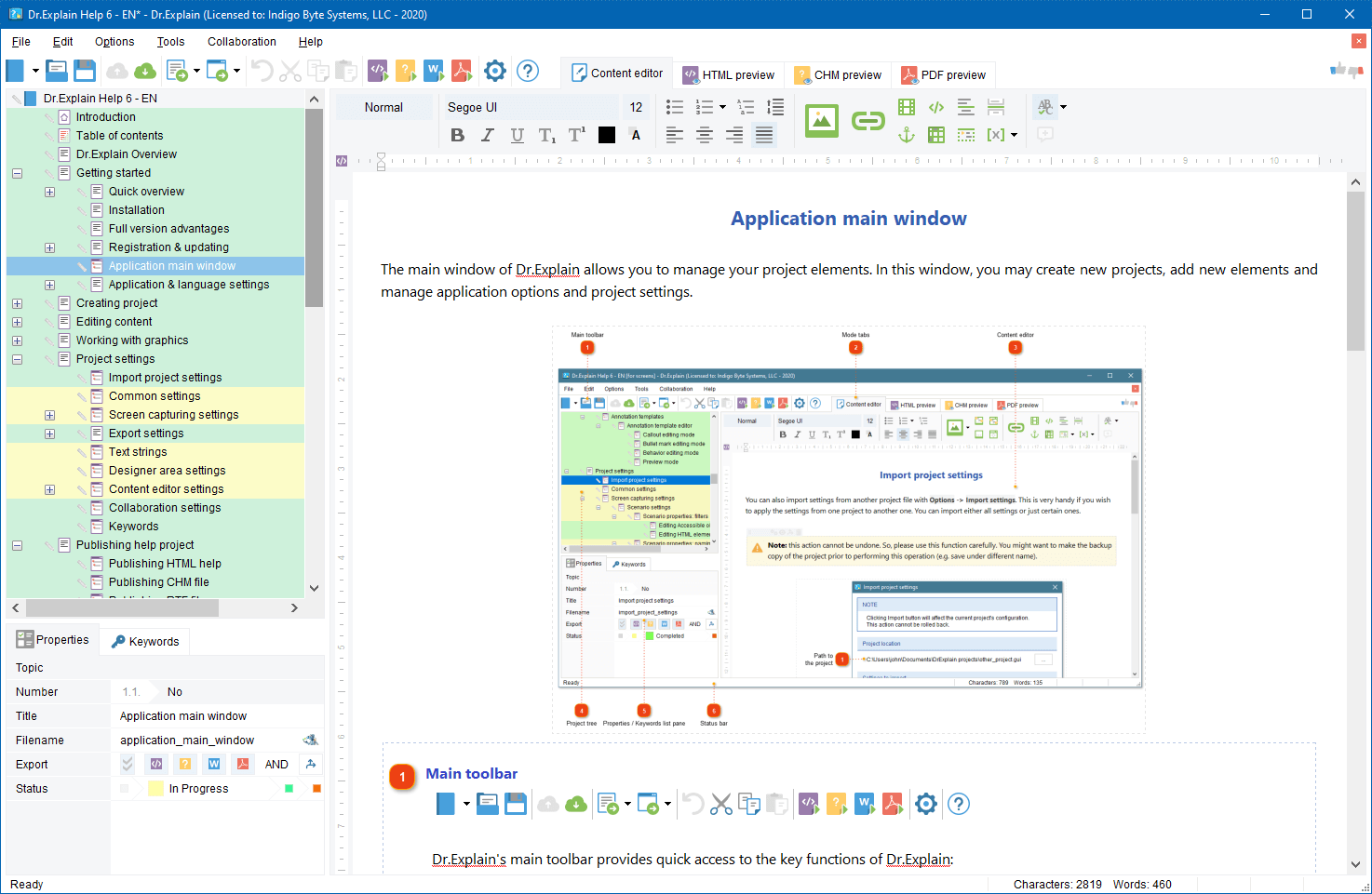
Dr.Explain v.3.0 ( http://www.drexplain.com ) is an innovative software documentation tool. Thanks to unique technology, with Dr.Explain you can produce attractive and professional looking help files just in a few hours, not in days.

The Dr.Explain captures windows, dialogs, and forms from live application and web pages, makes screenshots, and automatically adds interactive references to all controls. You have not to spend hours annotating your software GUI. Focus on your content - Dr.Explain will do all the tedious work for you. The program can produce CHM, RTF and HTML help files with annotated screenshots, live menus, cross-references, and navigation from a single source file.


Dr.Explain concept

What’s new in v.3.0

  • The new capturing engine captures and automatically documents windows, menus, GUI elements, web pages, and even flash applications
  • Revamped text editor allows pictures, tables, lists, fonts, multibyte encoding, RTL mode, etc…
  • Enhanced topic management supports topic statuses, marking and locking\unlocking
  • Lots of other improvements including optimized export routines, Google sitemap generator, predefined macro variables, and many more improvements and tweaks.

The new version download: http://www.drexplain.com/download

TBS Cover Editor

TBS Cover Editor ( http://www.trueboxshot.com ) is a full featured software box cover creator with 3D rendering and template library. We accomplished the project in partnership with True BoxShot Software.

With the TBS Cover Editor you can create your 3D box shot design in a single flat worksheet. Say goodbye to separate designs for each side; no more design slices in many image files. The single-sheet concept of the TBS Cover Editor allows you editing of all box sides on a single screen. The real time 3D preview immediately shows how your 3D box shot output image looks like without switching between different windows or applications.


TBS Cover Editor Box shot template library TBS Cover Editor box shot

With the TBS Cover Editor no additional expensive third party tools are required. The program supports all the steps of box shot creation: from drafting and design, to 3D scene setting and image rendering. You can create professional-quality 3D box shots with no extra expense in a single program. The TBS Cover Editor comes with a brilliant collection of software cover design templates for various types of software. You can make a box cover in less than two minutes.

The TBS Cover Editor has a powerful rendering engine that produces realistic 3D box shots by applying original 3D rendering and ray casting algorithms. Your every box shot will look as if it is made by a studio.

More details: http://www.trueboxshot.com

Both these products will automate the most tedious and time consuming routines of your software business – software help and documentation writing, and graphical design. The Dr.Explain and TBS Cover Editor will help you present your software product in a professional manner with minimal efforts. As a software vendor you may focus on your business growth and leave the dull operations to the specialized systems.

During the last months I tried not to aggressively promote our flagship application Dr.Explain in this blog. I’d like the ISV Kaizen Blog to be not an advertorial but a collection of simple tips and tricks useful for most of ISV and mISV.

This post is an exception because today we have a good news. Indigo Byte Systems officially released Dr.Explain 2.6. There are about 25 new features and enhancements in the new version. So, I’d like to tell you a bit more about the Dr.Explain today.

What is Dr.Explain:
Dr.Explain v.2.6 is an innovative software documentation tool.
It sounds boring, doesn’t it? So …

What benefits will Dr.Explain bring to your ISV business process:
Thanks to unique technology, with Dr.Explain you can produce attractive and professional looking help files just in a few hours. That would otherwise take days to create them manually.

The Dr.Explain captures windows, dialogs, and forms from live application, makes screenshots, and automatically adds interactive references to all controls. You have not to spend hours annotating your screenshots. Focus on your content - Dr.Explain will do all the tedious work for you.

The program can produce CHM, RTF and HTML help files with annotated screenshots, live menus, cross-references, and navigation from a single source file.

You can read more about Dr.Explain and download a free trial on http://www.drexplain.com

What new benefits does the version 2.6 bring to users:
Let’s name just the most important:
* Better recognition of Delphi and other programming languages controls
* Many usability improvements
* More Hot Keys
* Better keywords management
* Optimized output routines
There are 25 new features in the update.

I think you may also be interested in the Dr.Explain featured reviews and user testimonials.

One more good news from Dr.Explain
Nowadays, Dr.Explain and True BoxShot run the mutual discount program. If you order either Dr.Explain or True BoxShot software you will receive $15 discount for the second product. Now you may add two useful products to your ISV toolbox and save money.
More info: http://www.drexplain.com/order

From Kaizen point of view, Dr.Explain will save many hours of your valuable time that you may better spend on product development and promotion rather than on boring documentation writing. The tool will easily pay for itself on the first project.

There are many situations when you have an application but there is no help file with it, and you have no time to write complete documentation yourself. At the same time you have no budget to hire a professional technical writer who can do this tedious work for you. The situations come up fairly often and the cost-effective approach is best.

Read our new white papers: Writing Cost-Effective Documentation for Software Systems

If you deal with software development business then you likely have ever dealt with software documentation writing. Next time, when you are about to create or revamp a help system for your software start from this free on-line tool, Software Help Planner. It will advise the most suitable help system architecture for your software product.

Once you specify the key details of your software the tool will advise which help format to choose and what topics should be included in the documentation.

Please consider this amusing tool like a little joke that makes your life easier.