
Advanced search in HTML files
HTML files created by Dr.Explain support two search modes: basic and advanced. Basic search performs simple keyword matching. Advanced search provides improved accuracy by analyzing word forms and synonyms.
What is advanced search?
Advanced search is a server-side system that processes search requests through a dedicated Docker-based service that easily connects to your existing documentation website.
Key Benefits
The server-side search system provides several advantages over the traditional client-side search:
-
Improved search result ranking. More relevant results appear at the top, thanks to sophisticated ranking algorithms.
-
Search snippets with highlighted matches. Contextual snippets highlight matched terms.
-
Synonym and word form support. Synonyms and word forms are recognized (e.g., "guide" matches "manual", "thought" matches "think").
-
Better search results for large documentation sets. Advanced indexing and ranking algorithms prioritize context and precision, reducing irrelevant matches.
-
Search query language support. If you need to find topics containing exact words or not containing certain words, you can use search query language.
The following screenshots compare search outputs side-by-side:
|
Basic search
|
Advanced search
|
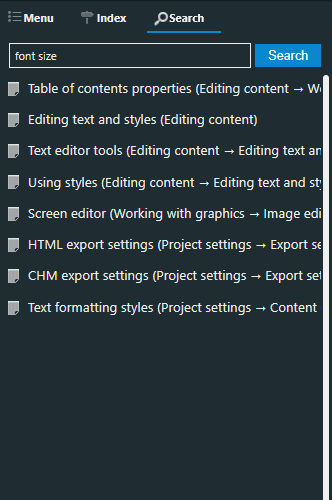 |
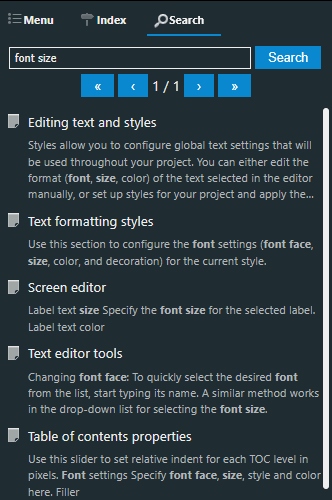 |
When to use advanced search
Server-side search is ideal for:
-
Large documentation sets with hundreds or thousands of topics.
-
Public-facing documentation where search performance and relevance are critical.
-
Enterprise deployments where you need centralized search management.
-
Documentation requiring advanced search features like synonym/word forms matching and result highlighting.
The following table compares basic and advanced search features:
|
Criteria
|
Basic search
|
Advanced search
|
|
Setup complexity
|
No server setup required
|
Requires Docker setup
|
|
Search relevance
|
Basic keyword matching
|
Advanced ranking algorithms
|
|
Result snippets
|
No
|
Yes, with highlighting
|
|
Synonym support
|
No
|
Yes
|
|
Word form support
|
No
|
Yes
|
|
Infrastructure
|
Client-side only; no infrastructure needed
|
Docker required
|
|
Best for
|
Small documentation sets
|
Large, complex documentation sets
|
See the detailed setup instructions.