



Published:
Creating clear online documentation is non‑negotiable for any software product. But publishing online user documentation so that users actually find and use it? That’s where most teams stumble. This article is about building a documentation set that helps your site rank higher on Google. You'll also find guidance on picking the right format for your help pages — and on turning them into a knowledge base that's actually organized and useful. There's plenty in here for technical writers, developers, and product managers alike. In addition, Dr.Explain is mentioned as a useful tool that can be used to automate the process of creating help documents in multiple formats and save hundreds of hours of tedious work.
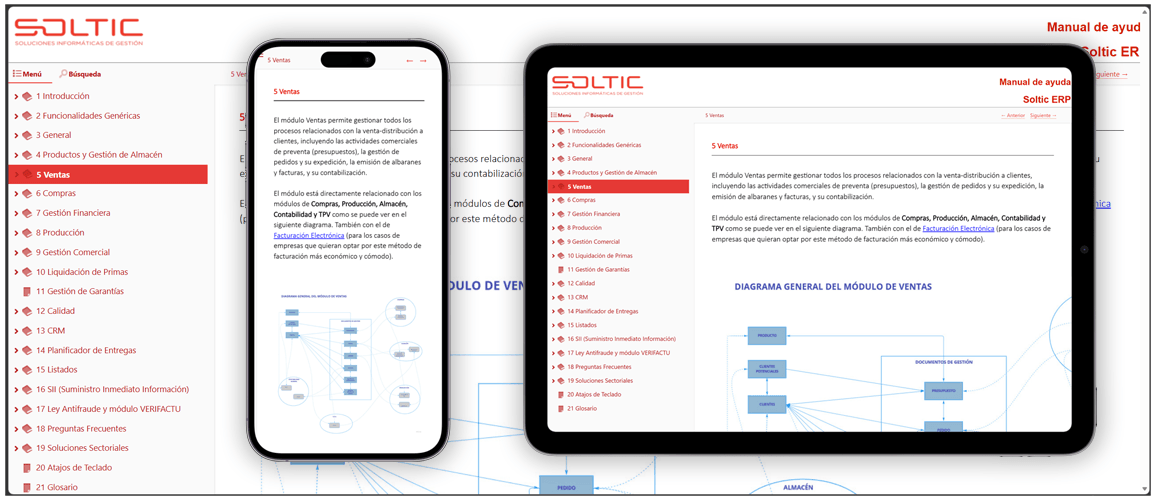
Why publishing online documentation correctly matters more than ever
Users expect help to be available instantly, anywhere. If your online help is hard to find or painful to navigate, they’ll abandon it — and flood your support channel. In 2026, search engines also prioritize pages that offer real value. A well‑published help site can attract new users via organic search, cutting acquisition costs.
A few years ago, you could upload a PDF to your website and be happy. The user might have not been thrilled, but they accepted it. Now they want help as they expect the rest of their digital life. It has to be found quickly and easily, searchable, and always within reach.
I've noticed a change in the last couple of years. People are turning to Google first for help rather than going to the helpdesk. If the information can't be found or isn't well organized, they move on. They take their business elsewhere, vent on social media, and rarely come back.
But there’s another side to this. When you publish documentation well—clean navigation, real search, mobile‑friendly layout—it starts working for you in ways that go beyond support. I’ve seen companies double their organic traffic just because their help content started ranking for the questions people were actually asking. That’s not a nice‑to‑have anymore. In a world where every customer acquisition dollar counts, a well‑published help site can become a quiet, reliable growth channel.
So yes, “publishing correctly” sounds like a technical detail. But in 2026, it’s really about meeting users where they already are: searching, skimming, expecting answers in seconds. Get it right, and you earn both their trust and their attention. Get it wrong, and you’re just adding friction to their day.
Key stat: According to a study by the Technical Communication Institute, 73% of users say they prefer using a product’s online documentation over contacting support — but only if they can find the answer in under two minutes.
Choosing the right format: HTML, PDF, or CHM?
When you create online documentation, the format dictates how users interact with it. Here’s a quick breakdown:
| Format | Best for | Key advantage |
|---|---|---|
| HTML (webhelp) | Always‑available online reference | Built‑in search, responsive design, SEO‑friendly |
| Offline reading, printing | Portable, exact page layout | |
| CHM | Integrated Windows help | Context‑sensitive support (F1) |
Modern help authoring tools for online docs let you publish all three from a single source — a practice called single sourcing documentation. It saves time and ensures consistency of the content. Dr.Explain, for example, does an excellent job at this: you only need to look after one project, and with a couple of clicks you'll have webhelp, PDF, and CHM files ready for distribution. You can download a free trial and see it for yourself.
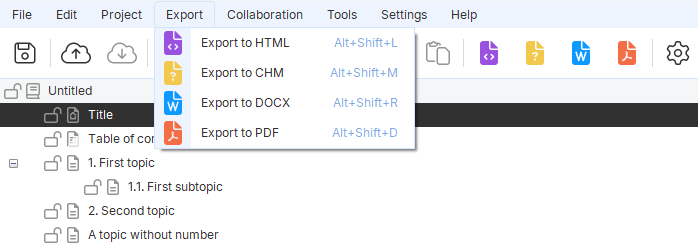
⚠️ Avoid HTML frames. They break mobile usability and confuse search engines. Choose frameless, responsive webhelp instead.
Designing navigation that users actually enjoy
Most people don’t read documentation from start to finish. They land on a page from Google or a link inside your app. That means your navigation in online help must work like a map, not a novel.
Over the years, I’ve learned that users don’t want fancy animations or clever interactions. They want to find what they want without having to think about the interface. So a few simple things, like a table of contents on every page, so that they don't get lost. Breadcrumbs that actually show the path back. And a search box that works instantly—no “loading” spinner, no irrelevant results.
The biggest shift I’ve seen? People rarely read documentation from start to finish anymore. They land on a page from Google or a link inside the app. So if your navigation doesn’t help them quickly figure out where they are and where else they might need to go, you’ve lost them. They’ll click away, and your support team will get the question instead.
When navigation is done right, it’s almost invisible. Users just move through the content, find their answer, and get back to work. That’s the goal: no confusion, no dead ends, no hunting. Just a quiet, reliable path from question to answer.
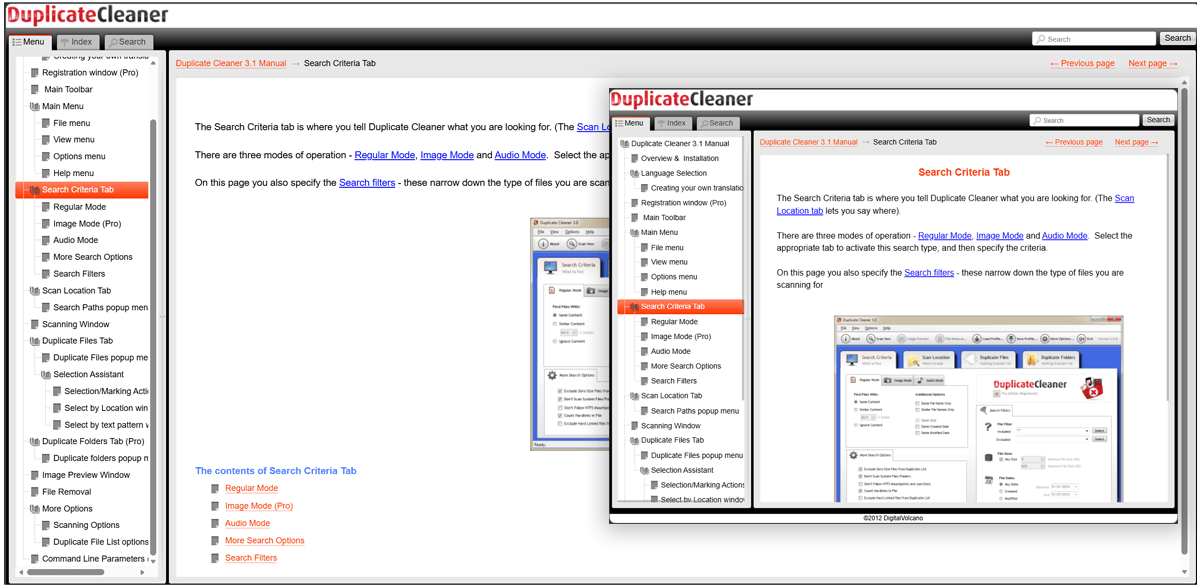
Tools like Dr.Explain can help here too. Its generated webhelp includes a persistent TOC, breadcrumbs, and full‑text search out‑of‑the‑box — you don’t need to build any of that by hand. Try it free to see how it looks.
Table of contents in online help
A persistent, collapsible table of contents in online help is a must. It shows where the user is and lets them jump anywhere with one click. Never hide it on a separate page — that’s a relic of the early 2000s.
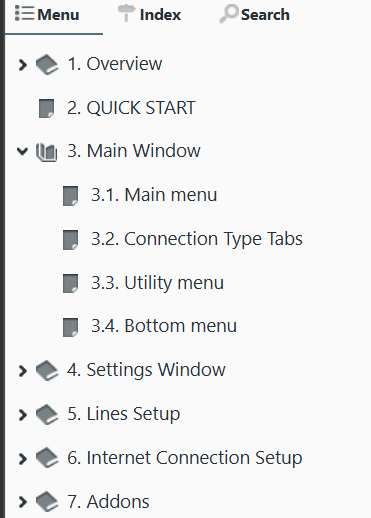
Breadcrumbs in documentation
Breadcrumbs in documentation tell users: “You are here → Home / Guides / Setup / Installation.” They reduce disorientation and improve usability, especially on deep sites.
Search functionality for help sites
Robust search functionality for help sites is no longer optional. Users expect a search box that delivers instant, relevant results. With modern HATs like Dr.Explain, you get full‑text search without any server‑side coding. It’s built right into the generated webhelp.
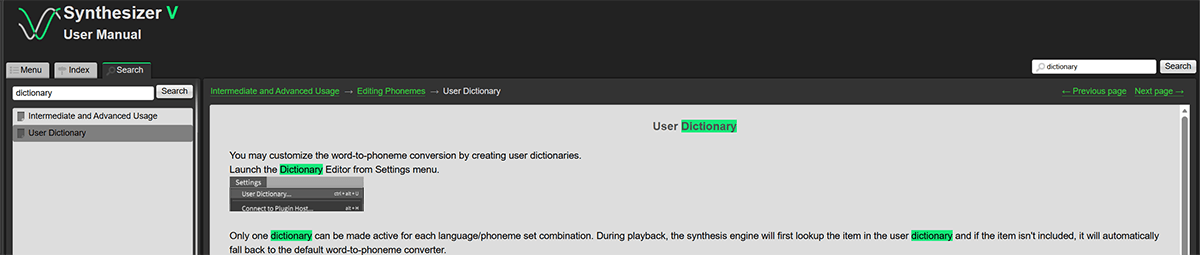
Branding and integration: make documentation feel like part of your product
Your online help should carry your logo, color scheme, and main navigation. When users see consistency, they trust the information more. Documentation and brand trust go hand in hand.
Also, cross-linking help pages with your pricing, blog, or support forms distributes link equity and helps search engines discover everything.
With Dr.Explain, you can customize the visual style of your webhelp to match your website — using built‑in themes or your own CSS. It’s a few clicks to make the documentation feel like it belongs to your brand. Grab the free trial and play with the templates.
Mobile‑friendly documentation: non‑negotiable in 2026
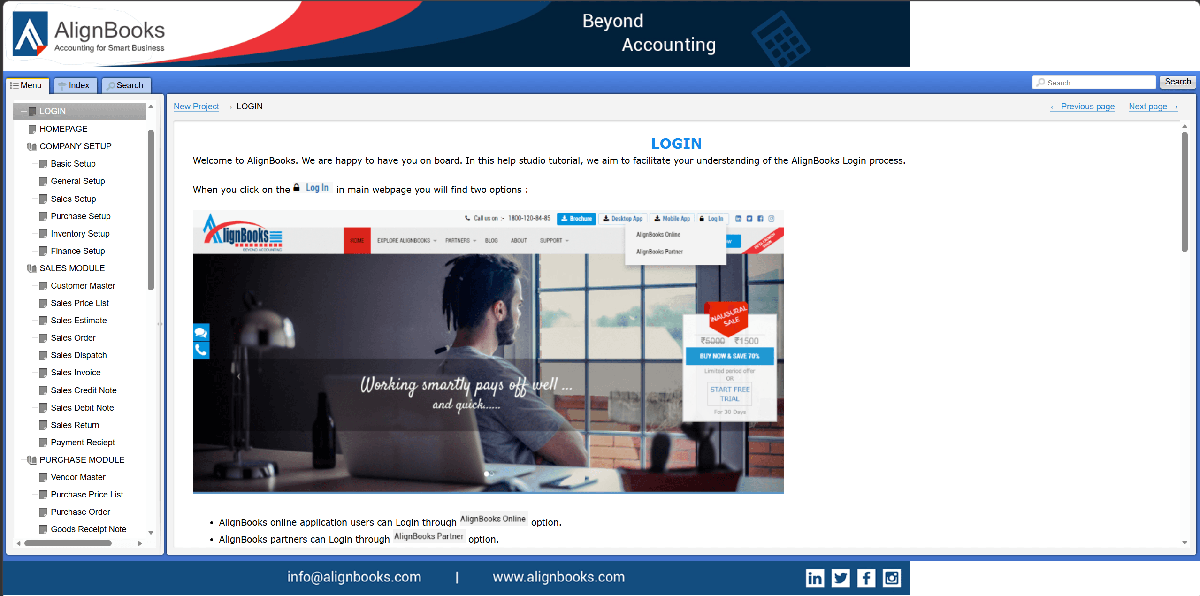
Over 60% of help site visits come from smartphones or tablets. If your responsive design for documentation isn’t flawless, you’re turning away more than half your readers. Look for a documentation generator for websites that produces adaptive layouts out‑of‑the‑box. Dr.Explain’s webhelp output is fully responsive — it looks good on a 27‑inch monitor and on a 6‑inch phone without extra work.
SEO best practices for online documentation
SEO for online documentation is often overlooked, yet it’s a goldmine. People search for solutions — if your help pages rank, they discover your product. Here’s how to make it happen:
- Write self‑contained topics. Each page should answer one specific question (e.g., “How to reset your password”).
- Use keyword‑rich headings. Include terms like “step‑by‑step”, “troubleshooting”, “guide”.
- Optimize image alt text. Describe what’s shown and add relevant keywords naturally.
- Link meaningfully. Instead of “click here”, use “learn how to export to PDF”.
- Keep URLs clean. Example:
example.com/docs/reset-password.html. - Submit an XML sitemap for your help section.
Dr.Explain helps with some of this automatically: it generates clean, keyword‑based filenames from topic titles and includes a search index that’s SEO‑friendly. You still need to write good content, but the technical side is taken care of.
Where to host your online documentation
You have two main options:
- Subfolder —
https://yourproduct.com/help/(easy to manage, passes domain authority). - Subdomain —
https://help.yourproduct.com(flexible for scaling, can be hosted separately).
Whichever you choose, make sure the entry point is an index.html. Most documentation generator for websites tools — Dr.Explain included — create this automatically.
Making your documentation easy to find
Even the best online documentation is rendered useless if no one can find it. Add links to it prominently in your main menu, on your support page, and within your application (context‑sensitive help). Always provide a downloadable version in PDF for easy off‑line access – it’s a small effort that makes all the difference in the user’s day.
Start publishing professional online documentation today
Build each page around one question a user might have. Give it a heading that says what's on it. Then link between pages where it helps, and make sure the layout works on a phone. The submission of a sitemap is also recommended. A solid help authoring tool can provide you with a strong starting point. Creating an informative help site is not a development team’s task. A professional tool for online documentation authoring will do all the complex formatting, cross-referencing, and searching for you. You may try the help authoring tool for online docs like Dr.Explain and see how it assists you in building a website of any complexity. All you need is to invest a little effort in learning the interface. The free trial version has no time limits but a project size limitation so that you can see most of the software’s features. And if you want to buy the product, you will not find any watermarks in your work files. Just give the program a chance to impress you with its intuitive design!