



Published: .
In April 2026, the State of Docs 2026 report was released, showing how documentation professionals around the world are doing. It’s a snapshot of an industry where AI has become routine and documentation is the product’s interface. We’ll highlight three aspects that are changing the tech writer’s profession right now:
- 76% of colleagues already use AI — and why you risk falling behind if you don’t do the same;
- which skills have become critical — they are no longer in old job descriptions;
- why documentation has turned into an interface that either sells or kills the product.
Who took part in the survey?
Who took part in the survey and why does it matter?
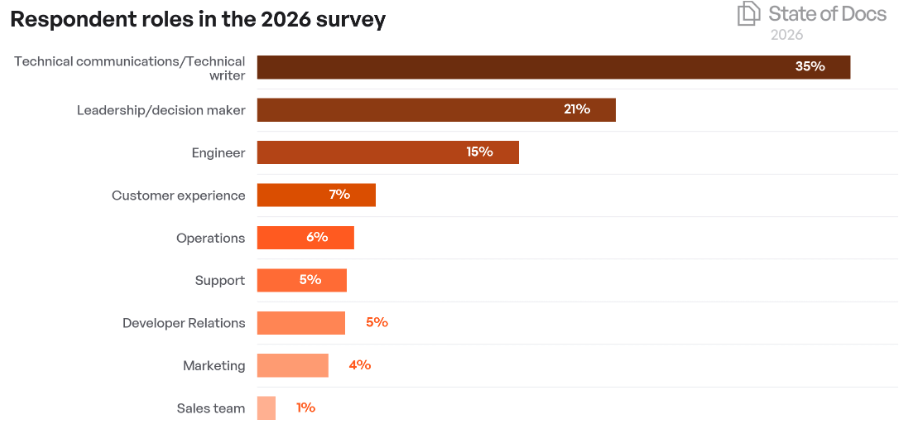
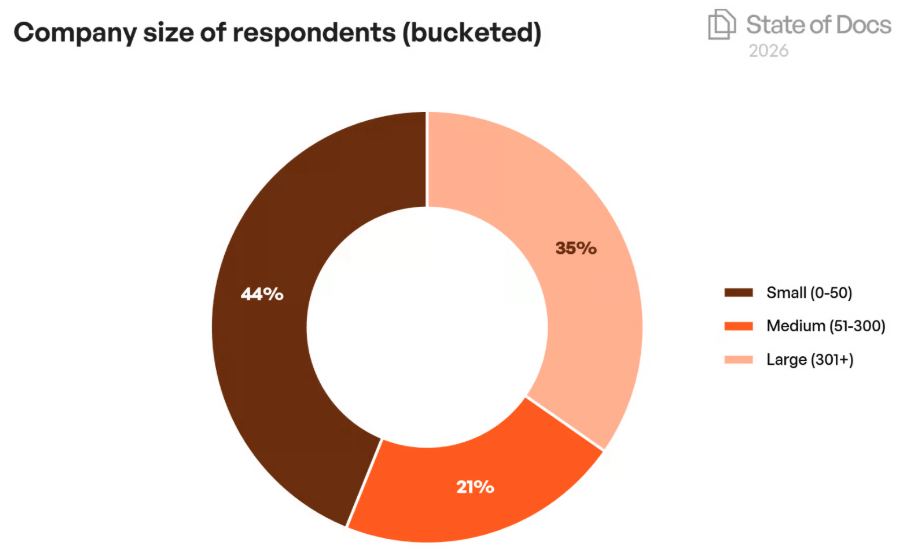
1,131 people participated — 2.5 times more than in 2025. The sample is broad: from startups to corporations. The main audience is technical writers and documentation managers (76%). The rest are developers, designers, marketers, and product leaders.
The geography is mainly the US, Europe, and India. The findings are universal. Most of the problems are the same everywhere: documentation navigation, outdated screenshots, jargon, and support requests.
The report reflects the reality of the international market.
How documentation affects sales and loyalty
88% of respondents said documentation is important or very important in purchase decisions. The documentation user is not necessarily the person who signs the check. In B2B, it is more often a technical specialist (developer, engineer, administrator). They read the help content to see if the product fits. If the documentation is bad or doesn’t answer their questions, they simply don’t recommend the product to the decision maker. The decision maker may never even hear about it. Documentation works at the technical approval stage — if it fails, there will be no sale.
Practical takeaway: if your help content is a black box with a table of contents, not a tool that solves problems, you lose customers before they ever reach sales.
The report’s authors emphasize that documentation has become part of the user experience — not a secondary artifact, but an interface. This echoes Nielsen Norman’s 10th usability heuristic: good help saves the product.
Scenario: when documentation actually sells
It works for products with long decision cycles: CRM, ERP, cloud platforms, DevOps tools. Users read the documentation before even signing up. If they find the answer in 5 minutes, loyalty grows. If not, they go to a competitor.
It does not work for free apps with short sessions. There, users expect the interface to be self‑explanatory. Documentation is only needed for rare problems.
AI in documentation creation: the threshold has been crossed
76% of respondents regularly use AI at work. These are no longer early adopters — it’s the majority. 78% say AI speeds up their work, and 35% save more than 50% of their time on some tasks.
What AI speeds up:
- Drafting (44% spend less time);
- Rephrasing and style improvement;
- Searching for answers in the knowledge base.
What AI does not speed up (and sometimes slows down):
- Fact‑checking — 43% spend more time;
- Editing generated content — 43% spend more time;
- Structuring documentation, information architecture.
Non‑obvious conclusion: AI hasn’t made technical writers lazy. It has redistributed their time. Drafting got faster, but fact‑checking and editing now take longer. There is net time savings, but not as much as AI tool marketers promise.
When AI really saves time — and when it doesn’t
It works for routine instructions, reference articles, FAQs, and generating examples. If you have a good template and clean data, AI will handle it.
It does not work for complex procedural documentation where each step depends on context and user role — for example, configuring medical equipment or avionics. AI will generate plausible nonsense, and you will spend a lot of time checking it.
Hidden complexity: governance. Only 44% of teams have formal or informal AI guidelines. This is a risk: who is responsible if AI writes a dangerous instruction? In user documentation, the cost of a mistake is brand reputation; in medical or industrial documentation, it’s lives. The report identifies this gap but doesn’t offer recipes. In practice, you need mandatory human review (at least spot‑checking) and logs of generated outputs.
AI‑powered documentation consumption: when the reader is not human
38% of organizations have already deployed chat interfaces for documentation interaction. 36% use AI search. The user asks a question in natural language, and the system returns an answer assembled from several articles.
This changes the rules. Previously you wrote for a human who scans the page with their eyes; now your reader is an AI agent. It does not tolerate:
- contradictions across sections;
- jargon without definitions;
- hidden assumptions (“as usual, click Next” — what if there is no button?);
- broken logic (step 1 in one section, step 2 in another).
For a knowledge base, this means your help content must be semantically structured. Use clear headings, bullet lists, tables. Avoid ambiguity. Test whether an AI bot can assemble a correct answer by taking pieces from different places.
Scenario where this is critical: a large B2B platform with thousands of help pages. The user asks the chatbot “how to export a report to Excel”. If the documentation is not optimized, the bot either won’t find the answer or will return an article about “export to CSV” — the customer gets frustrated and trust is lost.
56% of respondents are comfortable working with external AI integrations (e.g., OpenAI API for custom bots). This means the market is ready to pay for tools that make documentation machine‑readable. HAT tools (Help+Manual, MadCap Flare, etc.) already support conditional content, global variables, and semantic markup — exactly what AI consumption requires.
Technical writer profession: what is now part of the job
The report clearly shows that the profession is changing. The top 5 skills respondents identified as key in 2026:
- AI / prompt engineering — 50%
- Information architecture — 47%
- Content strategy — 46%
- Developer tools (Git, CI/CD) — 43%
- Documentation analytics (metrics, search) — 41%
Notice that pure “writing skill” has moved down. Not because it’s unnecessary, but because it’s a baseline requirement. Now, tech writers are expected to design the structure, set up automated builds, and teach the team how to formulate prompts for AI.
At the same time, 31% of respondents still use Git repositories as their primary documentation tool, and 45% use dedicated HAT tools (Help+Manual, MadCap Flare, and others). These numbers are not mutually exclusive — many teams use Git for storage and HAT for building and publishing.
Hidden complexity: the skills the report calls critical are often distributed among different people in small teams. Information architecture is the tech writer’s job, while CI/CD belongs to developers. Aligning processes is hard. But the report suggests that a technical writer should at least understand how the documentation generation pipeline works.
Are tech writers afraid that AI will take their jobs?
Yes, and that’s normal. The report captures anxiety. But a third of respondents report an increase in workload. AI will likely take away not the job, but the drudgery. The freed‑up time will go to strategy, user interviews, and improving architecture.
Our forecast: pure “copywriter for documentation” roles (just rewriting specs) will disappear. Those who can design, measure, and adapt content for different channels (including AI bots) will remain.
Tools and information architecture: the foundation of the AI era
70% of teams now consider AI when making information architecture decisions. A year ago, that figure was 59%. That’s significant growth.
What does this mean in practice?
- Companies are moving to a single source (single‑sourcing) to avoid contradictions;
- They are adopting semantic markup (schema.org, JSON‑LD) for key content types — instruction steps, warnings, code examples;
- They are setting up server‑side search with synonym support instead of client‑side “word‑only” search.
The table below compares two approaches to documentation: traditional (“whatever works”) and modern (AI‑ready).
| Parameter | Traditional approach | Modern approach (AI‑ready) |
|---|---|---|
| Structure | Pages thrown together, links sometimes go nowhere | Clear hierarchy, each page is a self‑contained topic |
| Terminology | Jargon, synonyms across sections | Glossary, consistent terms across the whole site |
| Search | Client‑side (JavaScript), no synonyms | Server‑side, ranking, logs of failed queries |
| Updates | Once a quarter or “when someone remembers” | With every release, in sync with code (CI/CD) |
| Metrics | “Feels fine” | Time to answer, search success rate, bounces |
There is no right or wrong approach. A small company with one product and three users can make the traditional approach work for years. But if you plan to grow, enter new markets, or deploy an AI bot, you will drown in maintenance without modern practices.
What the report missed — but matters for user documentation
The State of Docs 2026 report focuses on AI and tools. But several aspects are barely covered, even though they are critical for help systems.
Documentation analytics
Do you know which queries users search for in your help and don’t find? Where do they stop and leave? Without analytics, you are flying blind. AI search with logs, Google Analytics 4 integration, “was this helpful?” buttons — that’s the minimum. The report mentions metrics in passing, but in practice this is one of the main reasons documentation becomes useless.
Localization and cultural specifics
Translating documentation is not just word‑for‑word replacement. In China, for example, users expect a more hierarchical structure and validation from authoritative sources. A straight translation of a Western manual can fail. The 2026 report says almost nothing about localization — a big gap for global products.
Visuals and screenshots
AI cannot "look" at a screenshot (unless it’s a multimodal model, which is still expensive and slow). So text descriptions of each step are mandatory. But human users also want pictures. Balancing the two is hard. The report ignores this tension.
Outlook for 2027: where technical writers should focus
Based on the report’s data and the trends of recent years, we see three main directions that will define work with user documentation in the next 12–18 months.
- Documentation as a product, not a project. It will have owners, roadmaps, success metrics, and regular releases. The “write and forget” approach will disappear.
- Content separation by channel. The same material will be adapted for humans (web page), for AI bots (structured data), and for voice assistants (short phrases). Single sourcing becomes a necessity.
- Growing demand for tech writers who understand analytics. Not just “write nicely” but “prove that after updating the help, support tickets dropped by 40%”.
Companies that ignore these trends will fall behind. Their users will complain, their AI bots will hallucinate, and competitors will poach customers with better documentation.
Conclusion
The State of Docs 2026 report made one thing clear: documentation is no longer a static attachment to a product. It has become infrastructure that affects sales, customer retention, and even how teams are organized. Key takeaways:
- Documentation is infrastructure that impacts sales, loyalty, and support. Don’t treat it as a cost center.
- AI is everywhere. 76% of specialists use it. But time savings aren’t free — governance and fact‑checking have become more important.
- AI consumption of documentation (chats, bots) requires semantic structure. If your help isn’t machine‑readable, you are losing a new channel of user interaction.
- The tech writer profession is shifting: information architecture, content strategy, and basic CI/CD skills are now front and center.
- Fear of AI replacing people is real, but the reality is transformation, not disappearance. Demand for documentation is growing.
- Don’t forget analytics, localization, and screenshots — the report glosses over them, but they remain pain points for user documentation.
- Investments in the right tools (HATs with single‑sourcing support) and processes pay off through lower support costs and higher NPS.
If you want to do more than just read statistics — if you want to rethink your documentation strategy — start small: set up search query logging and run three usability tests with real users. We guarantee you’ll find surprises.