



Published: .
Summer 2026 gave us plenty of reasons for a documentation tools roundup — vendors shipped a wave of genuinely interesting updates. Two trends stand out: interactive API documentation and AI woven directly into the writing workflow. Some products are doubling down on deep technical functionality for experienced developers (Document360), others on accessibility for non-technical authors (Zendesk, iSpring). A few, like ClickHelp, are building out AI infrastructure for readers instead.
Here's a rundown of the summer's key releases — and what we think they mean.
Document360 v12.8.1: API Docs Become a Dev Environment
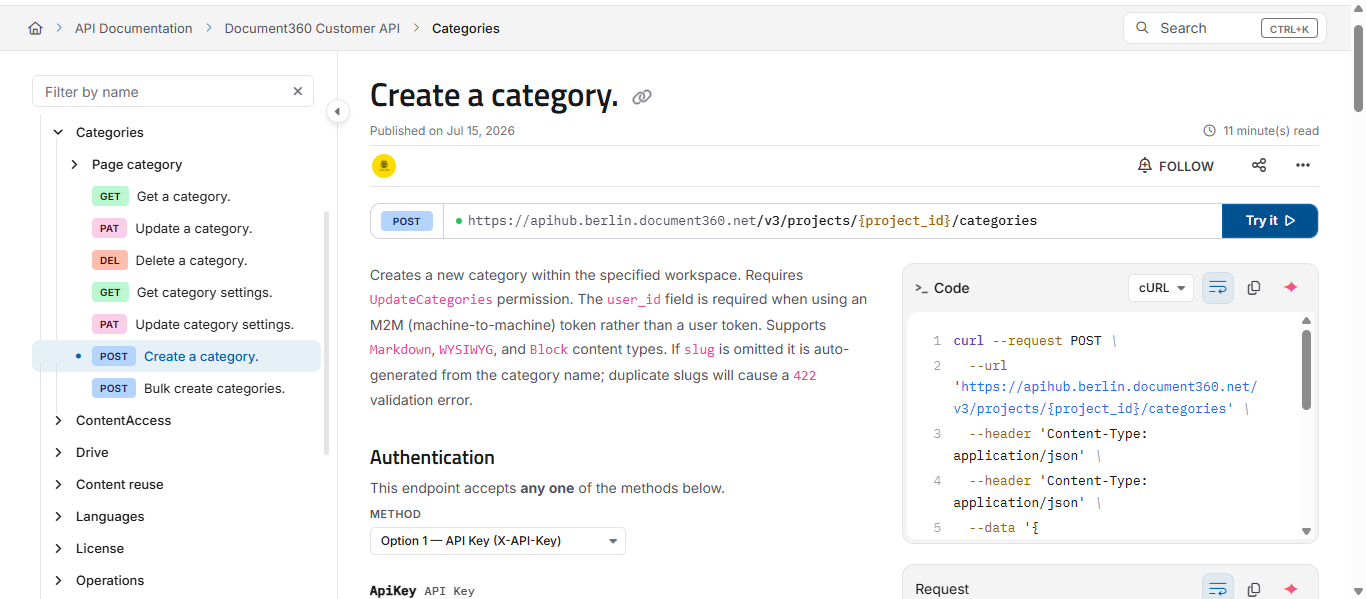
In August, Document360 shipped v12.8.1, a rebuild of the API reference pages. They're no longer static — the API description now comes with a live console for testing requests.
What's new:
- A rebuilt Try It! console — a three-pane layout: the method description on the left, a request editor with full control over parameters, headers, and body in the middle, and the server response on the right. Authorization for protected endpoints happens right in the console.
- Real-time schema validation — errors in the request body are flagged as you type.
- Session-level variables — set a value once and reuse it across every method, which makes testing chained calls much easier.
- Built-in Eddy AI — readers can ask questions about an API method right on the page: how authorization works, what a given parameter means. The AI answers using the documentation itself as context, so readers don't have to go hunting for the answer elsewhere.
- The early rollout of Widget 2.0 — a new architecture for embedding documentation on third-party sites. Currently available for testing, with migration on request.
API documentation is shedding its old identity as "text about an API" and turning into a working tool. Writers now have to worry not just about whether the descriptions are accurate, but whether the sample requests actually run. The new features aren't rolling out to everyone at once — new projects get them first, existing ones follow.
Document360 v12.8.2: API v3 and Managed AI
A week later came v12.8.2. Where 12.8.1 was about how readers interact with the API reference — through the interactive console and an AI assistant right on the page — this release reworks the integration architecture and access permissions.
What's new:
- API v3 — a fully rebuilt REST API with an expanded set of methods for managing content, users, roles, reader access, file storage, and analytics. OAuth 2.0 support has been added for connecting third-party apps. Integrations and scripts now run on scoped API keys with clearly defined permissions: who administers the portal, who can edit content, and which sections of the knowledge base a given key can reach. The older v1/v2 APIs keep working unchanged.
- Group-level access control for Eddy AI — admins can restrict AI features (Ask Eddy search, article summaries, recommendations, the MCP server, text-to-speech) for specific reader groups, while leaving them enabled by default for everyone else.
- A redesigned Smart Bar builder — live preview, an editing panel, language selection, bulk operations, and duplication.
- Ticket Deflector has been renamed to Get Help — URLs and breadcrumbs have changed, but old links still redirect correctly.
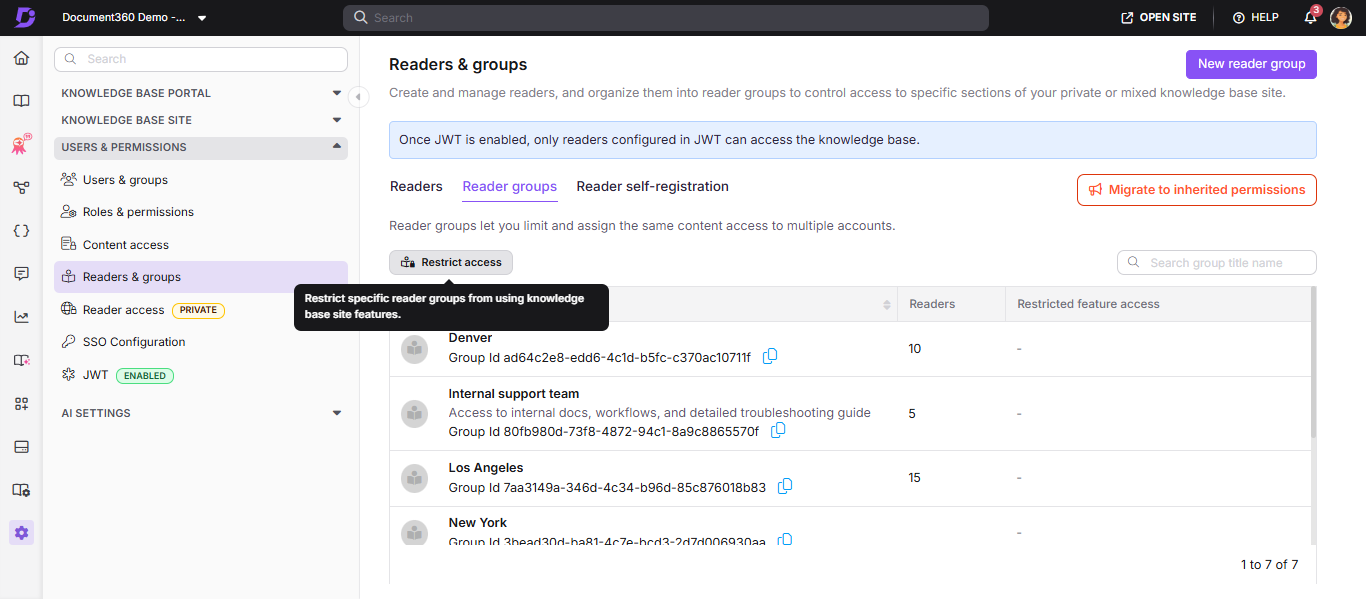
API v3 changes how Document360 integrates with outside systems: instead of one universal key, access can now be configured permission by permission. A technical writer who administers the knowledge base can now document not just the user-facing content, but the access model itself. And group-level control over Eddy AI adds real flexibility — AI is no longer on by default for everyone. If a single project serves both internal staff and external customers, an admin can decide in advance who gets smart search and who doesn't. That pushes the technical writer's job further: from "writing the text" to "designing the reader's experience based on their role."
What this means for technical writers in practice. You can now build documentation that a developer tests right on the reference page, without switching to a separate API testing tool. And you can decide exactly which reader groups get AI search — and which don't.
ClickHelp: AI Infrastructure for Readers, Plus Change Subscriptions
In August 2026, ClickHelp shipped a release that rethinks how readers interact with documentation. Rather than building AI into its own interface, ClickHelp lets readers connect their own AI agents to published documentation.
What's new:
- Published Docs MCP Server — readers can connect AI agents (Claude, Cursor, ChatGPT, Gemini) directly to published documentation. The agent reads the current published content and answers based on what's actually written there. It sees exactly what an anonymous visitor would see — public material only, with no access to restricted content or unpublished projects. Admins can turn the feature off entirely. More details in the Published Docs MCP Server docs.
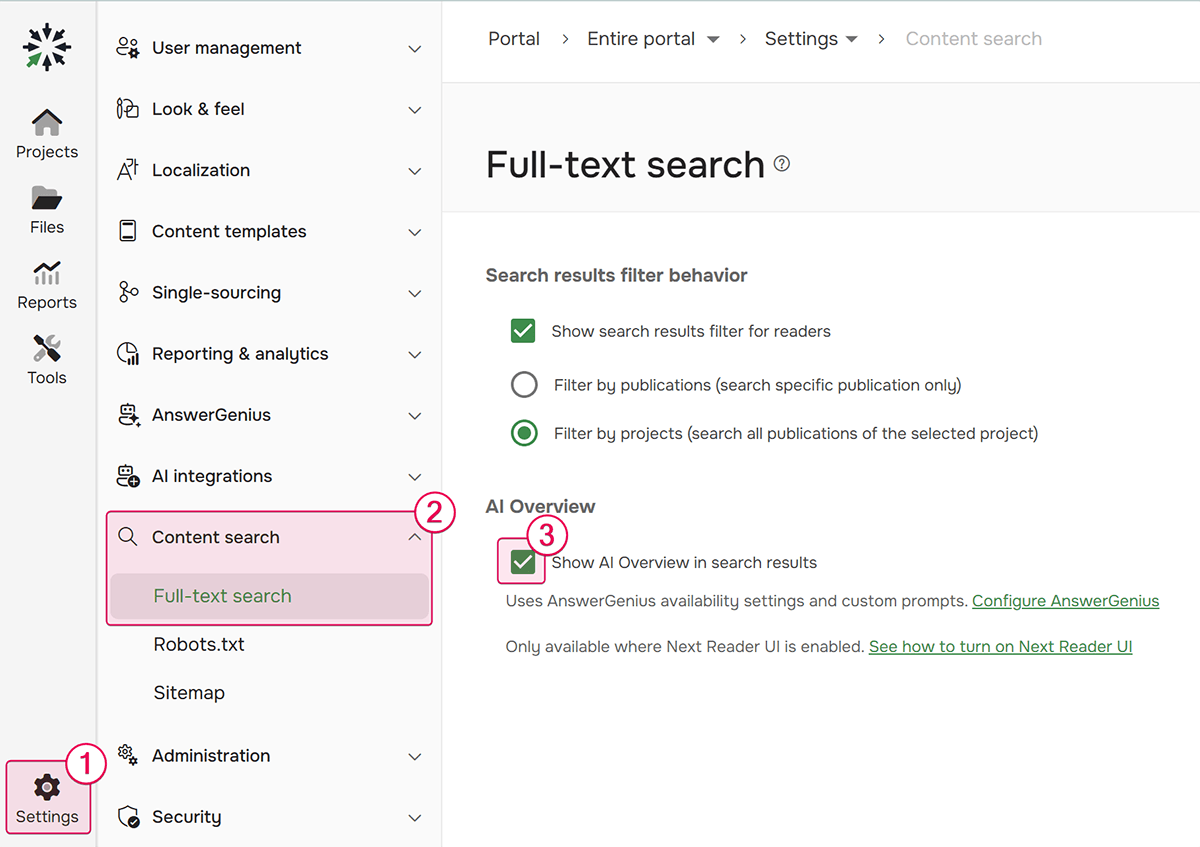
- AI Overview in search — a reader types a question into search and gets an answer generated from the documentation right there in the results, with follow-up questions possible without leaving search. It runs on your existing AnswerGenius settings, so there's nothing to reconfigure. More details in AI Overview in search results and AnswerGenius.
- Change subscriptions — Power Readers can subscribe to a topic or an entire publication and get an email whenever the content changes. Any reader, logged in or not, can open "Topic changes" and see exactly how the current version differs from the last one. More details in Notifications for Power Readers and Reader interface settings.
- An improved Quick Publish — before you publish, you get a full list of every topic that will go live.
ClickHelp is opening documentation up to the AI ecosystem, but in a fundamentally different way than Document360. Document360 builds AI into its own interface — the Try It! console, Eddy AI. ClickHelp instead hands documentation off to external AI agents through an MCP server, letting readers use whichever AI tool they already prefer. That shifts what a technical writer needs to think about: not just how a human reader will find information in the interface, but how an AI agent will find and interpret it.
Dr.Explain hasn't sat this one out either — it recently added its own AI assistant; you can read more about it in the user documentation.
Cloud-based tools had plenty to offer too.
SaaS Platform Updates: AI Infrastructure and Deeper Dev Integration
Beyond the classic HAT tools and editors, cloud documentation platforms saw some significant updates of their own this summer. SaaS vendors are folding AI straight into their architecture, and integration with development workflows is quickly becoming the norm rather than the exception.
Paligo: Next Gen Editor and AI Translations
In March 2026, Paligo announced a major release:
- Next Gen Editor — structured content without needing to know XML.
- AI Translations — translation right inside the CCMS.
- AI Assistant — writing help built in.
Paligo is making component content management approachable for authors without a technical background, while AI translation slots directly into the workflow.
Other SaaS Platforms
ReadMe — this update adds granular analytics controls and extends AI search to larger projects.
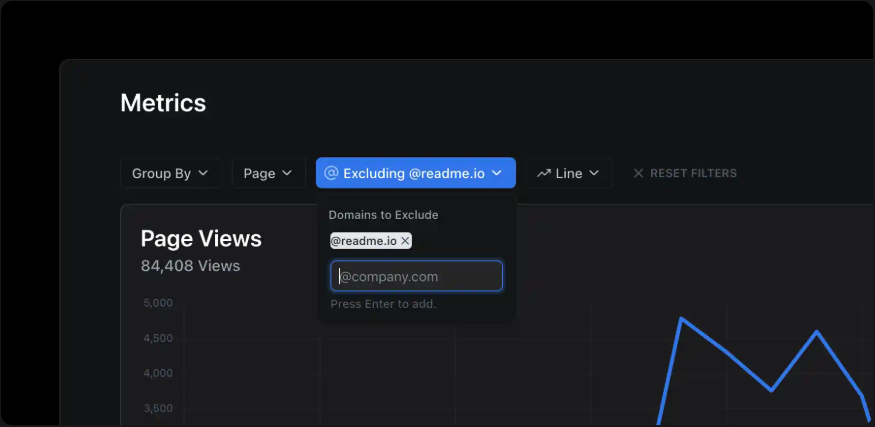
- You can now exclude traffic by email domain from your docs analytics, so employee pageviews don't skew the numbers.
- Search is better at matching compound terms from partial words.
- Ask AI now searches and answers across every project in an enterprise group, not just the one you're viewing.
- You can now see exactly where the same reusable content blocks are being used across different projects.
Plus a solid batch of fixes: PDF export for large projects, a more stable editor when switching between view and edit mode, and proper conflict handling when merging API documentation branches.
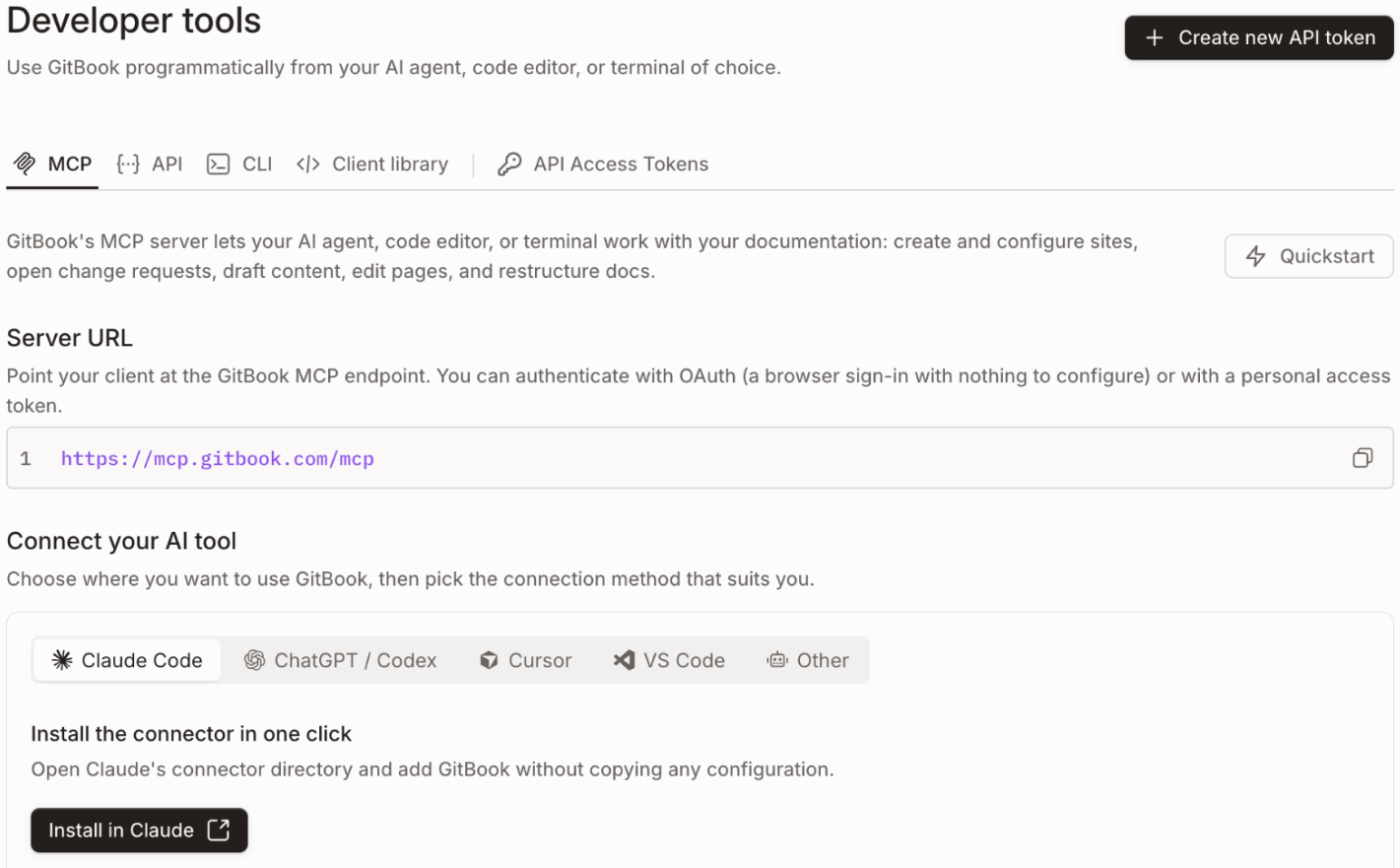
GitBook — the headline here: documentation is becoming part of the infrastructure for AI agents, and the Content API now supports far more automation.
- MCP connectors are now one click away, and the developer section has been rebuilt around MCP as the primary use case.
- The Content API lets you set a page's slug at creation time and link to pages that don't exist yet using temporary references.
- The page-creation response now returns full content and metadata, which opens the door to automated workflows.
- Search across very large knowledge bases is now faster and more accurate.
- Crawlers are now blocked from the AI endpoint, so they don't waste crawl budget on it.
Less visibly: pages load less JavaScript on first paint, and GitHub exports now check file sizes against the limit before they run.
Mintlify — this release focuses on collaborative editing and on expanding integrations for AI agents.
- Added Bitbucket Cloud support as a Git provider for Enterprise.
- Version history in the editor is now grouped by date, and autocommits kick in as you type.
- Branch creation is faster, and you can now carry unsaved edits over when you switch branches.
- Private pages now have their own version history and notifications.
- Integrations with Stripe, Notion, and Zendesk give the AI agent access to business context beyond the documentation itself.
They also fine-tuned search for exact identifier matches and added automatic redirects to a visitor's preferred browser language.
All three platforms are moving in the same direction this cycle: documentation is no longer content written for humans alone — it's becoming a data source for AI agents. GitBook puts MCP front and center, ReadMe extends Ask AI to search across an entire enterprise group of projects, and Mintlify hooks agents up to outside business systems like Stripe and Zendesk — meaning the agent needs to do more than read one article; it needs to pull an answer together from several sources at once. Docs-as-code is deepening in parallel: GitBook now has a programmable Content API that supports pages that don't exist yet, and Mintlify offers autocommits and branching that feel almost like working in an ordinary code repository. For a technical writer, that means content structure — clear identifiers, reusable blocks, markup that parses unambiguously — matters just as much as the writing itself, because this documentation will be read not only by people but by a model that has to extract something useful from it. And when a team is choosing a platform, the question increasingly isn't "can it publish manuals" — that's solved everywhere by now — but "can it serve content reliably to both humans and AI agents, at scale."
Summer 2026's updates point to two trends pulling in different directions, both equally strong:
| Trend | Examples | What it means |
|---|---|---|
| Interactivity and technical depth | Document360 (Try It! console, validation, Eddy AI) | Documentation is turning into a working environment, not just a reference. |
| AI infrastructure for readers | ClickHelp (MCP Server, AI Overview in search), Paligo (AI Translations) | Documentation is opening up to the AI ecosystem — readers connect their own AI agents, and search returns ready-made answers. |
Both trends grew out of concrete user demands. Developers want to test an API right in the documentation, without switching tabs. Readers want answers to their questions without hunting through pages — whether through AI search or their own AI agents. Neither need is going away anytime soon, so the direction the leading products have chosen is likely to stick.
In 2026, the technical writer is increasingly becoming an experience designer — someone who helps users solve problems faster and helps colleagues work more efficiently. Help authoring tools keep getting smarter, but that doesn't shrink the writer's role — it shifts it toward architecture, quality, and meaning.