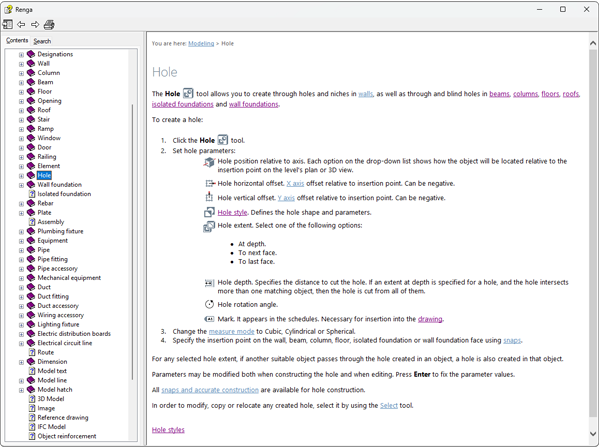

Background

CHM help file creator for desktop software that still ships F1

Build compiled HTML Help with a topic tree, search, and context IDs — and keep the same content ready for web help and PDF.
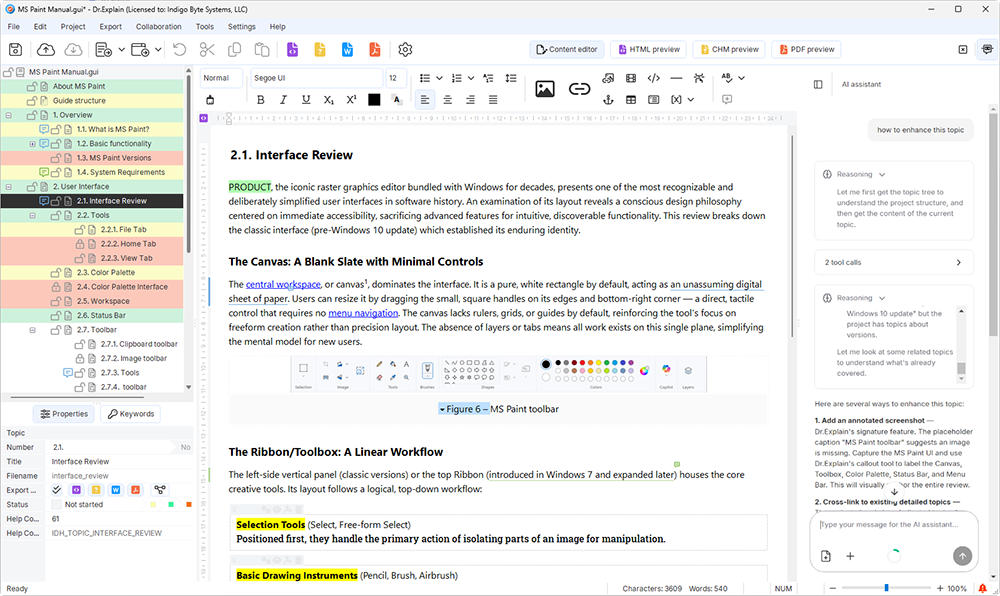
Dr.Explain interface
Context IDs
Map files
CHM
UI capture

When a CHM file is the right deliverable

Users expect F1 / local help inside Windows applications.

Help file

You need a single portable help file to ship with the installer.

Offline access matters (plants, field machines, locked networks).

You still want a web manual for the marketing site — from the same source.

One project → the format your channel needs

1
Compiled HTML Help (CHM)
TOC, index, search, hyperlinks — bundled for desktop distribution and context-sensitive calls from your app.
2
Online / HTML help
Publish to your site or intranet with navigation and search — no custom help stack required.
3
PDF & DOCX
Hand clients a printable manual or editable export without maintaining a second document.

Wire help to the UI your users are staring at

Help Context IDs

Assign IDs / aliases per topic. Generate map files (.h, .vb, .inc) for integration.

UI capture for Windows apps

Annotate dialogs and controls so CHM topics match the real product.

From blank project to a CHM you can ship

1
Author topics
Structure the help tree; capture screens.
2
Assign IDs
Map topics to controls / commands.
3
Compile & embed
Export CHM; call it from your app.
Create a CHM in the free trial

CHM help file creator FAQ

What is a CHM help file?

A CHM file is a compiled HTML Help package used widely with Windows applications — including table of contents, search, and context-sensitive help.

Can Dr.Explain create CHM files?

Yes. Author topics in Dr.Explain and export compiled CHM, with support for Help Context IDs and map files.

Can I also publish web help from the same project?

Yes. Single-source publishing covers HTML web help, PDF, and DOCX alongside CHM.

25

A quarter century of expertise

Over the past 25 years, we've grown from a small team into experts in our field. While we build on the wisdom of the past, we are equally focused on embracing new technologies — including AI — to keep our tool at the forefront of modern user documentation.

Download free trial

What our users say

“We significantly reduced support time with new customers… after describing everything in the product manual.”

Nik Valkovets, 2V

“The capture feature… saves so much time… less time making CHM help files. I like this tool. Thank you.”

Clovis Gay, Hocus Pocus Studio

“Dr. Explain presented excellent credentials. It combined a reasonable cost with a full suite of features.”

Joe T. Evans, Radiant Technologies

“We simply converted all the paper instructions into the internal format of the above-mentioned help authoring tools.”

Natalia Obukhova, Business analyst, CRM Expert

“Dr.Explain facilitates the updating of information, being a complete and easy-to-use tool. We would like to highlight that the excellent technical support makes it a platform that we will use for a long time.”

Antonio David López Fuentes, Operation Manager, Bisiona Business Solutions

“Dr.Explain saves me countless hours of copying, pasting, and linking documents by automatically capturing screens from my software, and generating interactive screenshots complete with callouts and links for all my window controls.”

Winnie Skosana, Technical Writer in Hensoldt

"Before using Dr.Explain, we packaged and published user guides as PDF documents or MS Word documents, and used Windows help compilers to create CHM help files. So it was a bunch of tools, and we had to maintain duplicate content".

Gary Arnold, Founder and CEO of Structured Solutions Inc.

"Dr.Explain has some functions that make it very easy to describe program windows and dialogs. Besides, it is very important for us that Dr.Explain offers a PDF export. This makes it possible to use the same sources to create a file for the program help (* .chm) and product documentation (* .pdf)".

Annette Wittner, Senior developer

Explore related documentation topics